語法
css
cubic-bezier(0.25, 0.1, 0.25, 1)
cubic-bezier(0.1, -0.6, 0.2, 0)
cubic-bezier(0, 0, 1, 1)
引數
該函式接受以下四個引數,它們表示兩個控制點的座標:
描述
三次貝塞爾函式,通常稱為“平滑”緩動函式,將輸入進度與輸出進度關聯起來,兩者都表示為<number>,其中 0.0 表示初始狀態,1.0 表示最終狀態。如果三次貝塞爾曲線無效,CSS 會忽略整個屬性。
三次貝塞爾曲線由四個點定義:P0、P1、P2 和 P3。點 P0 和 P3 表示曲線的起點和終點。在 CSS 中,起點 P0 固定為 (0, 0),終點 P3 固定為 (1, 1),而中間點 P1 和 P2 分別由函式引數 (<x1>, <y1>) 和 (<x2>, <y2>) 定義。x 軸表示輸入進度,y 軸表示輸出進度。
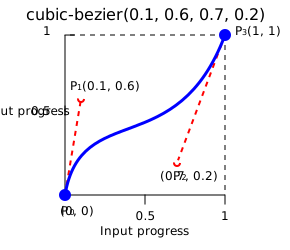
並非所有三次貝塞爾曲線都適合作為緩動函式,因為並非所有曲線都是數學函式;即,對於給定的 x 軸座標,其值為零或一的曲線。在 P0 和 P3 固定為 CSS 定義的情況下,當且僅當 P1 和 P2 的 x 軸座標都在 [0, 1] 範圍內時,三次貝塞爾曲線才是一個函式,因此有效。
當 P1 或 P2 的縱座標超出 [0, 1] 範圍時,三次貝塞爾曲線可能導致值超出最終狀態然後返回。在動畫中,這會產生一種“彈跳”效果。
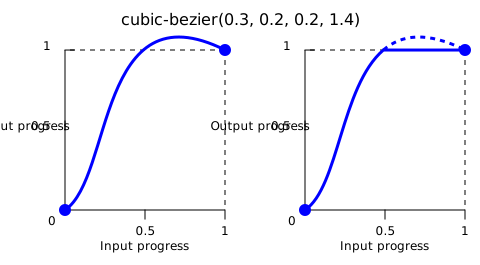
然而,如果輸出超出允許範圍,某些屬性會限制輸出。例如,rgb() 中大於 255 或小於 0 的顏色分量將被剪裁到最接近的允許值(分別為 255 和 0)。某些 cubic-bezier() 值就表現出這種特性。
正式語法
<cubic-bezier()> =
  cubic-bezier( [ <number [0,1]> , <number> ]#{2} )
示例
彈跳效果
在此示例中,紅球從其原始位置過渡時會從盒子中彈跳出來。這是因為 P2 值之一 2.3 超出了 [0, 1] 範圍。
css
span {
  transition: translate 0.3s cubic-bezier(0.3, 0.8, 0.3, 2.3);
}
使用 cubic-bezier() 函式
這些三次貝塞爾曲線在 CSS 中是有效的
css
/* The canonical Bézier curve with four <number> in the [0,1] range */
cubic-bezier(0.1, 0.7, 1.0, 0.1)

/* Using <integer> is valid because any <integer> is also a <number> */
cubic-bezier(0, 0, 1, 1)

/* Negative values for ordinates are valid, leading to bouncing effects */
cubic-bezier(0.1, -0.6, 0.2, 0)

/* Values greater than 1.0 for ordinates are also valid */
cubic-bezier(0, 1.1, 0.8, 4)
這些三次貝塞爾曲線定義是無效的
css
/* Parameters must be numbers */
cubic-bezier(0.1, red, 1.0, green)

/* X coordinates must be in the [0, 1] range */
cubic-bezier(2.45, 0.6, 4, 0.1)

/* There must be exactly four parameters */
cubic-bezier(0.3, 2.1)

/* X coordinates must be in the [0, 1] range */
cubic-bezier(-1.9, 0.3, -0.2, 2.1)
規範
| 規範 |
|---|
| CSS 緩動函式級別 1 # 三次貝塞爾緩動函式 |
瀏覽器相容性
載入中…
另見
- 其他緩動函式:
linear()和steps() - CSS 緩動函式模組
- Lea Verou 的cubic-bezier.com