offset-path
Baseline 廣泛可用 *
offset-path CSS 屬性指定一個供元素跟隨的路徑,並決定該元素在其父容器或 SVG 座標系中的位置。這個路徑可以是直線、曲線或幾何圖形,元素將沿著它定位或移動。
offset-path 屬性與 offset-distance、offset-rotate 和 offset-anchor 屬性結合使用,以控制元素沿路徑的位置和方向。
試一試
offset-path: path("M-70,-40 C-70,70 70,70 70,-40");
offset-path: path("M0,0 L60,70 L-60,30z");
<section class="default-example" id="default-example">
  <div class="transition-all" id="example-element"></div>
  <button id="playback" type="button">Play</button>
</section>
#example-element {
  width: 24px;
  height: 24px;
  background: #2bc4a2;
  animation: distance 8000ms infinite linear;
  animation-play-state: paused;
  clip-path: polygon(0% 0%, 70% 0%, 100% 50%, 70% 100%, 0% 100%, 30% 50%);
}

#example-element.running {
  animation-play-state: running;
}

#playback {
  position: absolute;
  top: 0;
  left: 0;
  font-size: 1em;
}

@keyframes distance {
  0% {
    offset-distance: 0%;
  }
  100% {
    offset-distance: 100%;
  }
}

#default-example {
  position: relative;
}
const example = document.getElementById("example-element");
const button = document.getElementById("playback");

button.addEventListener("click", () => {
  if (example.classList.contains("running")) {
    example.classList.remove("running");
    button.textContent = "Play";
  } else {
    example.classList.add("running");
    button.textContent = "Pause";
  }
});
語法
/* Default */
offset-path: none;

/* Line segment */
offset-path: ray(45deg closest-side contain);
offset-path: ray(contain 150deg at center center);
offset-path: ray(45deg);

/* URL */
offset-path: url("#my-circle");

/* Basic shape */
offset-path: circle(50% at 25% 25%);
offset-path: ellipse(50% 50% at 25% 25%);
offset-path: inset(50% 50% 50% 50%);
offset-path: polygon(30% 0%, 70% 0%, 100% 50%, 30% 100%, 0% 70%, 0% 30%);
offset-path: path("M 0,200 Q 200,200 260,80 Q 290,20 400,0 Q 300,100 400,200");
offset-path: rect(5px 5px 160px 145px round 20%);
offset-path: xywh(0 5px 100% 75% round 15% 0);

/* Coordinate box */
offset-path: content-box;
offset-path: padding-box;
offset-path: border-box;
offset-path: fill-box;
offset-path: stroke-box;
offset-path: view-box;

/* Global values */
offset-path: inherit;
offset-path: initial;
offset-path: revert;
offset-path: revert-layer;
offset-path: unset;
值
offset-path 屬性接受 <offset-path> 值、<coord-box> 值或兩者,或 none 關鍵字。<offset-path> 值可以是 ray() 函式、<url> 值或 <basic-shape> 值。
none-
指定元素不遵循任何偏移路徑。
none值等同於元素沒有任何偏移變換。在這種情況下,元素的移動由其預設的位置屬性(如top和left)決定,而不是偏移路徑。這是預設值。 <offset-path>-
一個
ray()函式、<url>值或<basic-shape>值,用於指定幾何偏移路徑。如果省略,<coord-box>值的路徑形狀為inset(0 round X),其中X是建立包含塊的元素的border-radius值。ray()-
定義一條從設定位置開始、具有設定長度、並以指定角度延伸的線。
ray()函式最多接受四個引數——一個<angle>、一個可選的大小值、可選的關鍵字contain和一個可選的at <position>。 <url>-
指定一個 SVG 形狀元素的 ID。該路徑是
url()函式中透過id引用的 SVG<circle>、<ellipse>、<line>、<path>、<polygon>、<polyline>或<rect>元素的形狀。如果 URL 沒有引用形狀元素或因其他原因無效,則偏移路徑的解析值為path("M0,0")(這是一個有效的<basic-shape>值)。 <basic-shape>-
將偏移路徑指定為一個 CSS 基本形狀函式的等效路徑,例如
circle()、ellipse()、inset()、path()、polygon()、rect()或xywh()。例如,如果<basic_shape>是一個ellipse()函式,則路徑是橢圓的輪廓,從橢圓的最右點開始,順時針旋轉一整圈。對於接受at <position>引數的ellipse()和circle(),如果省略了<position>,則位置預設為center,除非元素指定了offset-position。在這種情況下,offset-position的值將用作at <position>引數。可以使用shape()函式定義更復雜的形狀。
<coord-box>-
指定包含路徑的參考盒的大小資訊。參考盒派生自為此元素建立包含塊的元素。此引數是可選的。如果未指定,在 CSS 上下文中預設值為
border-box。在 SVG 上下文中,該值被視為view-box。如果使用ray()或<basic-shape>定義偏移路徑,<coord-box>值分別為射線或<basic-shape>提供參考盒。如果使用<url>定義偏移路徑,<coord-box>值為形狀元素提供了視口和使用者座標系,其原點 (0 0) 在左上角,大小為1px。
描述
offset-path 屬性定義了動畫元素可以遵循的路徑。偏移路徑可以是一個帶有一個或多個子路徑的指定路徑,也可以是一個未設定樣式的基本幾何形狀。元素在偏移路徑上的確切位置由 offset-distance 屬性決定。每個形狀或路徑必須為 offset-distance 計算值為 0 的情況定義一個初始位置,併為物件在初始位置的旋轉方向定義一個初始方向。
早期版本的規範將此屬性稱為 motion-path。後來改為 offset-path,因為該屬性描述的是靜態位置,而非運動。
正式定義
正式語法
offset-path =
  none                          |
  <offset-path> || <coord-box>

<offset-path> =
  <ray()>        |
  <url>          |
  <basic-shape>

<coord-box> =
  <paint-box>  |
  view-box

<ray()> =
  ray( <angle>          &&
  <ray-size>?           &&
  contain?              &&
  [ at <position> ]? )

<paint-box> =
  <visual-box>  |
  fill-box      |
  stroke-box

<ray-size> =
  closest-side     |
  closest-corner   |
  farthest-side    |
  farthest-corner  |
  sides

<position> =
  <position-one>   |
  <position-two>   |
  <position-four>

<visual-box> =
  content-box  |
  padding-box  |
  border-box

<position-one> =
  left                 |
  center               |
  right                |
  top                  |
  bottom               |
  x-start              |
  x-end                |
  y-start              |
  y-end                |
  block-start          |
  block-end            |
  inline-start         |
  inline-end           |
  <length-percentage>

<position-two> =
  [ left | center | right | x-start | x-end ] && [ top | center | bottom | y-start | y-end ]  |
  [ left | center | right | x-start | x-end | <length-percentage> ] [ top | center | bottom | y-start | y-end | <length-percentage> ]  |
  [ block-start | center | block-end ] && [ inline-start | center | inline-end ]  |
  [ start | center | end ]{2}

<position-four> =
  [ [ left | right | x-start | x-end ] <length-percentage> ] && [ [ top | bottom | y-start | y-end ] <length-percentage> ]  |
  [ [ block-start | block-end ] <length-percentage> ] && [ [ inline-start | inline-end ] <length-percentage> ]  |
  [ [ start | end ] <length-percentage> ]{2}

<length-percentage> =
  <length>      |
  <percentage>
示例
使用盒模型邊緣定位建立 offset-path
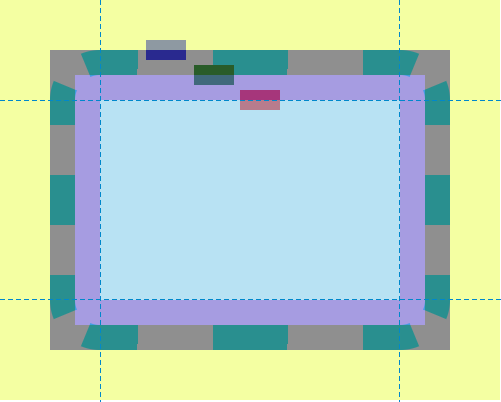
此示例演示了在 offset-path 屬性中使用各種 <coord-box> 值。
.box {
  width: 40px;
  height: 20px;
  animation: move 8000ms infinite ease-in-out;
}

.blueBox {
  background-color: blue;
  offset-path: border-box;
  offset-distance: 5%;
}

.greenBox {
  background-color: green;
  offset-path: padding-box;
  offset-distance: 8%;
}

.redBox {
  background-color: red;
  offset-path: content-box;
  offset-distance: 12%;
}

@keyframes move {
  0%,
  20% {
    offset-distance: 0%;
  }
  80%,
  100% {
    offset-distance: 100%;
  }
}
在這個示例中,外邊距、邊框和內邊距被有意地設定了較大的值,以演示藍色、綠色和紅色矩形在它們各自的 <coord-box> 邊緣(border-box、padding-box 和 content-box)上的位置。
結果
使用 path() 建立 offset-path
在此示例中,<svg> 元素建立了一個帶煙囪的房子,並定義了一把剪刀的兩半。房子和煙囪由矩形和多邊形組成,剪刀的兩半由兩個不同的 path 元素表示。在 CSS 程式碼中,offset-path 屬性用於為剪刀的兩半指定要遵循的路徑。這個 CSS 定義的路徑與 SVG 中 <path> 元素表示的路徑相同,即房子的輪廓,包括煙囪。
<svg
  xmlns="http://www.w3.org/2000/svg"
  width="700"
  height="450"
  viewBox="350 0 1400 900">
  <title>House and Scissors</title>
  <rect x="595" y="423" width="610" height="377" fill="blue" />
  <polygon points="506,423 900,190 1294,423" fill="yellow" />
  <polygon points="993,245 993,190 1086,190 1086,300" fill="red" />
  <path
    id="house"
    d="M900,190 L993,245 V201 A11,11 0 0,1 1004,190 H1075 A11,11 0 0,1 1086,201 V300 L1294,423 H1216 A11,11 0 0,0 1205,434 V789 A11,11 0 0,1 1194,800 H606 A11,11 0 0,1 595,789 V434 A11,11 0 0,0 584,423 H506 L900,190"
    fill="none"
    stroke="black"
    stroke-width="13"
    stroke-linejoin="round"
    stroke-linecap="round" />
  <path
    id="first-scissor-half"
    class="scissor-half"
    d="M30,0 H-10 A10,10 0 0,0 -20,10 A20,20 0 1,1 -40,-10 H20 A10,10 0 0,1 30,0 M-40,20 A10,10 1 0,0 -40,0 A10,10 1 0,0 -40,20 M0,0" />
  <path
    id="second-scissor-half"
    class="scissor-half"
    d="M30,0 H-10 A10,10 0 0,1 -20,-10 A20,20 0 1,0 -40,10 H20 A10,10 0 0,0 30,0 M-40,-20 A10,10 1 0,0 -40,0 A10,10 1 0,0 -40,-20 M0,0" />
</svg>
.scissor-half {
  offset-path: path(
    "M900,190 L993,245 V201 A11,11 0 0,1 1004,190 H1075 A11,11 0 0,1 1086,201 V300 L1294,423 H1216 A11,11 0 0,0 1205,434 V789 A11,11 0 0,1 1194,800 H606 A11,11 0 0,1 595,789 V434 A11,11 0 0,0 584,423 H506 L900,190"
  );
  transform: translate(0px, 0px);
  fill: green;
  stroke: black;
  stroke-width: 5px;
  stroke-linejoin: round;
  stroke-linecap: round;
  fill-rule: evenodd;
  offset-anchor: 0 0;
}

#first-scissor-half {
  animation:
    move 12s linear infinite,
    rotate-left 1s infinite;
}
#second-scissor-half {
  animation:
    move 12s linear infinite,
    rotate-right 1s infinite;
}

@keyframes move {
  from {
    offset-distance: 0%;
  }
  to {
    offset-distance: 100%;
  }
}

@keyframes rotate-left {
  0% {
    offset-rotate: auto 0deg;
  }
  50% {
    offset-rotate: auto -45deg;
  }
  100% {
    offset-rotate: auto 0deg;
  }
}

@keyframes rotate-right {
  0% {
    offset-rotate: auto 0deg;
  }
  50% {
    offset-rotate: auto 45deg;
  }
  100% {
    offset-rotate: auto 0deg;
  }
}
結果
如果沒有 offset-path 屬性,剪刀的兩半將預設位於畫布的左上角。然而,透過使用 offset-path,剪刀的兩半與 SVG 路徑的起點對齊,從而可以沿著它移動。
使用 url() 建立 offset-path
此示例說明了如何引用 SVG 形狀來定義元素可以遵循的路徑形狀。綠色圓圈(由 .target 定義)遵循一個矩形的路徑,該路徑是透過使用 url() 將 SVG 形狀的 ID(svgRect)傳遞給 offset-path 屬性來定義的。
此處顯示的定義路徑形狀的 SVG 矩形僅用於直觀地演示綠色圓圈確實在沿著此矩形定義的路徑移動。
<div class="outer">
  <div class="target"></div>
</div>
<svg width="400" height="200" xmlns="http://www.w3.org/2000/svg">
  <rect id="svgRect" x="50" y="50" width="200" height="100" />
</svg>
.target {
  width: 50px;
  height: 50px;
  border-radius: 50%;
  background-color: green;
  offset-path: url("#svgRect");
  offset-anchor: auto;
  animation: move 5s linear infinite;
}

#svgRect {
  fill: antiquewhite;
  stroke: black;
  stroke-width: 2;
}

@keyframes move {
  0% {
    offset-distance: 0%;
  }
  100% {
    offset-distance: 100%;
  }
}
不同的形狀
此示例涉及不同的 <basic-shape> 值:circle()、ellipse()、inset()、polygon()。
<div class="container">
  <div class="mover mover-path">path()</div>
  <div class="mover mover-circle">circle()</div>
  <div class="mover mover-ellipse">ellipse()</div>
  <div class="mover mover-inset">inset()</div>
  <div class="mover mover-polygon">polygon()</div>
</div>
.container {
  border: 1px solid black;
  width: 80vw;
  height: 80vh;
  position: relative;
  left: 10vw;
  top: 10vh;
}

.mover {
  width: 100px;
  height: 80px;
  border-radius: 50%;
  line-height: 80px;
  text-indent: 10px;
  background: url("data:image/svg+xml,%3Csvg xmlns='http://www.w3.org/2000/svg' id='e644da42-a34e-4ceb-a89a-89a4eb6dcc51' data-name='Layer 1' viewBox='0 0 71.08 54.62'%3E%3Ctitle%3Epointer-hand%3C/title%3E%3Cpath d='M43.56,49.35a5.24,5.24,0,0,0-1.27-3.43,5.26,5.26,0,0,0,1.86-9,5.26,5.26,0,0,0-.5-9.53L66.12,27c2.28-.07,5-1.57,5-4.58a5.06,5.06,0,0,0-4.58-4.83L34.08,17c3.48-2.89,6.26-6.55,6.73-11.08C41.45-.14,36.07-1.15,35,1.09,32,7.11,23,12.75,17.42,15.52,8.64,19.08,0,19.77,0,34.56,0,42.7,2.7,47.94,9.42,51c5.51,2.52,13.71,3.59,25.36,3.59H38.3A5.27,5.27,0,0,0,43.56,49.35Z'/%3E%3C/svg%3E")
    no-repeat;
  background-size: cover;
  color: white;
  animation: move 10s linear infinite;
  font-family: monospace;
  position: absolute;
  left: 50%;
  transform: translateX(-50%);
  transform-origin: center center;
}
.mover-path {
  top: 50px;
  motion-path: path(
    "M18.45,58.46s52.87-70.07,101.25-.75,101.75-6.23,101.75-6.23S246.38,5.59,165.33,9.08s-15,71.57-94.51,74.56S18.45,58.46,18.45,58.46Z"
  );
  offset-path: path(
    "M18.45,58.46s52.87-70.07,101.25-.75,101.75-6.23,101.75-6.23S246.38,5.59,165.33,9.08s-15,71.57-94.51,74.56S18.45,58.46,18.45,58.46Z"
  );
}
.mover-circle {
  top: 150px;
  offset-path: circle(100px at 50px 50px);
  motion-path: circle(100px at 50px 50px);
}
.mover-ellipse {
  top: 250px;
  offset-path: ellipse(25% 40% at 50% 50%);
  motion-path: ellipse(25% 40% at 50% 50%);
}
.mover-inset {
  top: 350px;
  offset-path: inset(5% 20% 15% 10%);
  motion-path: inset(5% 20% 15% 10%);
}
.mover-polygon {
  top: 450px;
  offset-path: polygon(
    30% 0%,
    70% 0%,
    100% 30%,
    100% 70%,
    70% 100%,
    30% 100%,
    0% 70%,
    0% 30%
  );
  motion-path: polygon(
    30% 0%,
    70% 0%,
    100% 30%,
    100% 70%,
    70% 100%,
    30% 100%,
    0% 70%,
    0% 30%
  );
}

@keyframes move {
  100% {
    motion-offset: 100%;
    offset-distance: 100%;
  }
}
規範
| 規範 |
|---|
| Motion Path Module Level 1 # offset-path 屬性 |
瀏覽器相容性
載入中…