<easing-function>
Baseline 廣泛可用 *
<easing-function> CSS 資料型別表示一個數學函式,用於描述值變化的速率。
這種兩個值之間的過渡可以應用於不同的場景。它可用於描述動畫過程中值的變化速度。這使你可以在動畫持續時間內改變動畫的速度。你可以為 CSS transition 和 animation 屬性指定緩動函式。
語法
/* Keyword linear easing function */
linear                /* linear(0, 1) */

/* Custom linear easing functions */
linear(0, 0.25, 1)
linear(0, 0.25 75%, 1)

/* Keyword cubic Bézier easing functions */
ease                  /* cubic-bezier(0.25, 0.1, 0.25, 1) */
ease-in               /* cubic-bezier(0.42, 0, 1, 1) */
ease-out              /* cubic-bezier(0, 0, 0.58, 1) */
ease-in-out           /* cubic-bezier(0.42, 0, 0.58, 1) */

/* Custom cubic Bézier easing function */
cubic-bezier(0.25, 0.1, 0.25, 1)

/* Keyword step easing functions */
step-start            /* steps(1, jump-start) */
step-end              /* steps(1, jump-end) */

/* Custom step easing functions */
steps(4, end)
steps(10, jump-both)
值
<easing-function> 可以是以下型別之一:
<linear-easing-function>-
建立以恆定速率進行的過渡。此函式可以使用以下方法之一指定:
linear-
指定恆定的插值速率,在整個持續時間內進度速率沒有變化(即沒有加速或減速)。此關鍵字值等同於
linear(0, 1)。它也可以表示為cubic-bezier(0, 0, 1, 1)。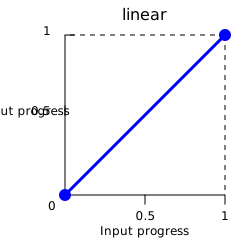
注意:
linear關鍵字始終被解釋為linear(0, 1),而函式linear(0, 1)被解釋為linear(0 0%, 1 100%)。 linear()-
使用
<number>值定義多個進度點,並可選擇使用<percentage>值來控制它們的時序。
<cubic-bezier-easing-function>-
建立具有可變變化速率的平滑過渡。此函式可以使用以下方法之一指定:
ease-
表示緩動函式
cubic-bezier(0.25, 0.1, 0.25, 1)。它表示插值開始緩慢,急劇加速,然後逐漸減速直至結束。它類似於ease-in-out關鍵字,但它在開始時加速更急劇。 ease-in-
表示緩動函式
cubic-bezier(0.42, 0, 1, 1)。它表示插值開始緩慢,然後逐漸加速直至結束,此時突然停止。 ease-out-
表示緩動函式
cubic-bezier(0, 0, 0.58, 1)。它表示插值突然開始,然後逐漸減速直至結束。 ease-in-out-
表示緩動函式
cubic-bezier(0.42, 0, 0.58, 1)。它表示插值開始緩慢,加速,然後減速直至結束。在開始時,它表現得像ease-in關鍵字;在結束時,它像ease-out關鍵字。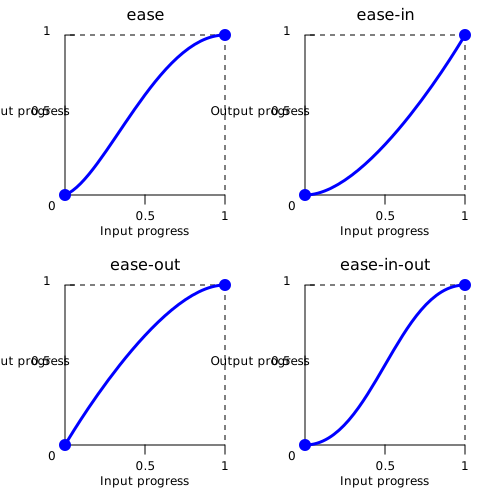
cubic-bezier()-
使用四個
<number>值定義自定義曲線,這些值指定兩個控制點的座標。x 座標必須在[0, 1]範圍內。
<step-easing-function>-
建立分步過渡,將動畫分成若干等長間隔,導致動畫從一個步驟跳到下一個步驟而不是平滑過渡。此函式可以使用以下方法之一指定:
step-start-
表示緩動函式
steps(1, jump-start)或steps(1, start)。它表示插值立即跳到其最終狀態,並保持在該狀態直到結束。 step-end-
表示緩動函式
steps(1, jump-end)或steps(1, end)。它表示插值保持在其初始狀態直到結束,此時它直接跳到其最終狀態。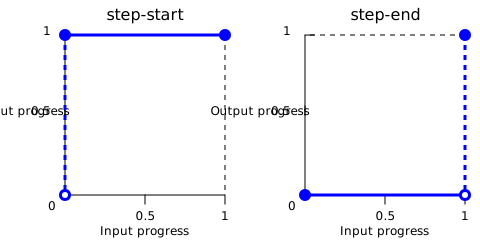
steps()-
使用
<integer>建立階梯狀曲線,以指定間隔數和可選關鍵字來控制跳躍的時序。
正式語法
<easing-function> =
  <linear-easing-function>        |
  <cubic-bezier-easing-function>  |
  <step-easing-function>

<linear-easing-function> =
  linear      |
  <linear()>

<cubic-bezier-easing-function> =
  ease              |
  ease-in           |
  ease-out          |
  ease-in-out       |
  <cubic-bezier()>

<step-easing-function> =
  step-start  |
  step-end    |
  <steps()>

<linear()> =
  linear( [ <number> && <percentage>{0,2} ]# )

<cubic-bezier()> =
  cubic-bezier( [ <number [0,1]> , <number> ]#{2} )

<steps()> =
  steps( <integer> , <step-position>? )

<step-position> =
  jump-start  |
  jump-end    |
  jump-none   |
  jump-both   |
  start       |
  end
示例
緩動函式比較
此示例透過動畫提供了不同緩動函式之間的輕鬆比較。從下拉選單中,你可以選擇一個緩動函式——有幾個關鍵字以及一些 cubic-bezier() 和 steps() 選項。選擇一個選項後,你可以使用提供的按鈕開始和停止動畫。
HTML
<div>
  <div></div>
</div>
<ul>
  <li>
    <button class="animation-button">Start animation</button>
  </li>
  <li>
    <label for="easing-select">Choose an easing function:</label>
    <select id="easing-select">
      <option selected>linear</option>
      <option>linear(0, 0.5 50%, 1)</option>
      <option>ease</option>
      <option>ease-in</option>
      <option>ease-in-out</option>
      <option>ease-out</option>
      <option>cubic-bezier(0.1, -0.6, 0.2, 0)</option>
      <option>cubic-bezier(0, 1.1, 0.8, 4)</option>
      <option>steps(5, end)</option>
      <option>steps(3, start)</option>
      <option>steps(4)</option>
    </select>
  </li>
</ul>
CSS
body > div {
  position: relative;
  height: 100px;
}

div > div {
  position: absolute;
  width: 50px;
  height: 50px;
  background-color: blue;
  background-image: radial-gradient(
    circle at 10px 10px,
    rgb(25 255 255 / 80%),
    rgb(25 255 255 / 40%)
  );
  border-radius: 50%;
  top: 25px;
  animation: 1.5s infinite alternate;
}

@keyframes move-right {
  from {
    left: 10%;
  }

  to {
    left: 90%;
  }
}

li {
  display: flex;
  align-items: center;
  justify-content: center;
  margin-bottom: 20px;
}
JavaScript
const selectElem = document.querySelector("select");
const startBtn = document.querySelector("button");
const divElem = document.querySelector("div > div");

startBtn.addEventListener("click", () => {
  if (startBtn.textContent === "Start animation") {
    divElem.style.animationName = "move-right";
    startBtn.textContent = "Stop animation";
    divElem.style.animationTimingFunction = selectElem.value;
  } else {
    divElem.style.animationName = "unset";
    startBtn.textContent = "Start animation";
  }
});

selectElem.addEventListener("change", () => {
  divElem.style.animationTimingFunction = selectElem.value;
});
結果
規範
| 規範 |
|---|
| CSS 緩動函式級別 1 # 緩動函式 |
瀏覽器相容性
載入中…
另見
- CSS 緩動函式模組
- CSS 動畫模組
- CSS 過渡模組
- Jake Archibald 的
linear()緩動生成器 - Lea Verou 的 cubic-bezier.com