試一試
font-kerning: auto;
font-kerning: normal;
font-kerning: none;
<section class="default-example" id="default-example">
  <div class="transition-all" id="example-element">
    “We took Tracy to see ‘THE WATERFALL’ in W. Virginia.”
  </div>
</section>
section {
  font-family: serif;
}
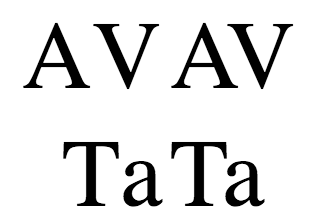
字偶間距 影響字母間的間距。在經過良好調整字偶間距的字型中,此功能透過減少某些字元組合之間的空白,使字元間距更均勻、更易於閱讀。
例如,在下面的圖片中,左側的示例不使用字偶間距,而右側的示例使用字偶間距。
語法
css
font-kerning: auto;
font-kerning: normal;
font-kerning: none;

/* Global values */
font-kerning: inherit;
font-kerning: initial;
font-kerning: revert;
font-kerning: revert-layer;
font-kerning: unset;
值
正式定義
| 初始值 | auto |
|---|---|
| 應用於 | 所有元素和文字。它也適用於 ::first-letter 和 ::first-line。 |
| 繼承性 | 是 |
| 計算值 | 同指定值 |
| 動畫型別 | 離散 |
正式語法
font-kerning =
  auto    |
  normal  |
  none
示例
啟用和停用字偶間距
HTML
html
<div id="kern"></div>
<div id="no-kern"></div>
<textarea id="input">AV T. ij</textarea>
CSS
css
div {
  font-size: 2rem;
  font-family: serif;
}

#no-kern {
  font-kerning: none;
}

#kern {
  font-kerning: normal;
}
JavaScript
js
const input = document.getElementById("input");
const kern = document.getElementById("kern");
const noKern = document.getElementById("no-kern");

input.addEventListener("keyup", () => {
  kern.textContent = input.value; /* Update content */
  noKern.textContent = input.value;
});

kern.textContent = input.value; /* Initialize content */
noKern.textContent = input.value;
規範
| 規範 |
|---|
| CSS 字型模組第 4 級 # font-kerning-prop |
瀏覽器相容性
載入中…