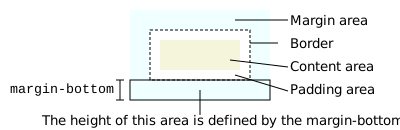
margin-bottom
Baseline 廣泛可用 *
試一試
margin-bottom: 1em;
margin-bottom: 10%;
margin-bottom: 10px;
margin-bottom: 0;
<section id="default-example">
  <div id="container">
    <div class="row"></div>
    <div class="row transition-all" id="example-element"></div>
    <div class="row"></div>
  </div>
</section>
#container {
  width: 300px;
  height: 200px;
  display: flex;
  align-content: flex-start;
  flex-direction: column;
  justify-content: flex-start;
}

.row {
  height: 33.33%;
  display: inline-block;
  border: solid #ce7777 10px;
  background-color: #2b3a55;
  flex-shrink: 0;
}

#example-element {
  border: solid 10px #ffbf00;
  background-color: #2b3a55;
}
此屬性對非替換內聯元素(例如 <span> 或 <code>)沒有影響。
語法
css
/* <length> values */
margin-bottom: 10px; /* An absolute length */
margin-bottom: 1em; /* relative to the text size */
margin-bottom: 5%; /* relative to the nearest block container's width */
margin-bottom: anchor-size(width);
margin-bottom: calc(anchor-size(--my-anchor self-block, 20px) / 3);

/* Keyword values */
margin-bottom: auto;

/* Global values */
margin-bottom: inherit;
margin-bottom: initial;
margin-bottom: revert;
margin-bottom: revert-layer;
margin-bottom: unset;
margin-bottom 屬性可以指定為關鍵字 auto,或 <length>,或 <percentage>。其值可以是正值、零或負值。
值
<length>-
邊距的大小為固定值。
- 對於錨點定位元素,
anchor-size()函式會解析為一個相對於相關錨點元素寬度或高度的<length>值(參見根據錨點大小設定元素邊距)。
- 對於錨點定位元素,
<percentage>-
邊距的大小為百分比,相對於包含塊的內聯尺寸(在水平書寫模式下是寬度,由
writing-mode定義)。 auto-
瀏覽器會選擇一個合適的值來使用。請參閱
margin。
正式定義
正式語法
margin-bottom =
  <length-percentage>  |
  auto                 |
  <anchor-size()>

<length-percentage> =
  <length>      |
  <percentage>

<anchor-size()> =
  anchor-size( [ <anchor-name> || <anchor-size> ]? , <length-percentage>? )

<anchor-name> =
  <dashed-ident>

<anchor-size> =
  width        |
  height       |
  block        |
  inline       |
  self-block   |
  self-inline
示例
設定正負底部外邊距
HTML
html
<div class="container">
  <div class="box0">Box 0</div>
  <div class="box1">Box 1</div>
  <div class="box2">Box one's negative margin pulls me up</div>
</div>
CSS
用於設定 div 元素的 margin-bottom 和 height 的 CSS
css
.box0 {
  margin-bottom: 1em;
  height: 3em;
}
.box1 {
  margin-bottom: -1.5em;
  height: 4em;
}
.box2 {
  border: 1px dashed black;
  border-width: 1px 0;
  margin-bottom: 2em;
}
容器和 div 元素的一些定義,以便更清楚地看到外邊距的效果
css
.container {
  background-color: orange;
  width: 320px;
  border: 1px solid black;
}
div {
  width: 320px;
  background-color: gold;
}
結果
規範
| 規範 |
|---|
| CSS Box Model Module Level 3 # margin-physical |
瀏覽器相容性
載入中…