align-content
Baseline 廣泛可用 *
CSS align-content 屬性設定了 flexbox 的交叉軸,或 grid 或塊級元素的塊軸上,內容項之間和周圍空間的分佈。
下面的互動式示例使用網格佈局演示了此屬性的一些值。
試一試
align-content: start;
align-content: center;
align-content: space-between;
align-content: space-around;
<section class="default-example" id="default-example">
  <div class="example-container">
    <div class="transition-all" id="example-element">
      <div>One</div>
      <div>Two</div>
      <div>Three</div>
    </div>
  </div>
</section>
#example-element {
  border: 1px solid #c5c5c5;
  display: grid;
  grid-template-columns: 60px 60px;
  grid-auto-rows: 40px;
  column-gap: 10px;
  height: 180px;
}

#example-element > div {
  background-color: rgb(0 0 255 / 0.2);
  border: 3px solid blue;
}
此屬性對單行彈性容器(即具有 flex-wrap: nowrap 的容器)沒有影響。
語法
/* Normal alignment */
align-content: normal;

/* Basic positional alignment */
/* align-content does not take left and right values */
align-content: start;
align-content: center;
align-content: end;
align-content: flex-start;
align-content: flex-end;

/* Baseline alignment */
align-content: baseline;
align-content: first baseline;
align-content: last baseline;

/* Distributed alignment */
align-content: space-between;
align-content: space-around;
align-content: space-evenly;
align-content: stretch;

/* Overflow alignment */
align-content: safe center;
align-content: unsafe center;

/* Global values */
align-content: inherit;
align-content: initial;
align-content: revert;
align-content: revert-layer;
align-content: unset;
值
normal-
專案按其預設位置打包,就像未設定
align-content值一樣。 start-
專案在交叉軸上緊密地堆疊在對齊容器的起始邊緣。
center-
專案在交叉軸上緊密地堆疊在對齊容器的中心。
end-
專案在交叉軸上緊密地堆疊在對齊容器的結束邊緣。
flex-start-
專案根據彈性容器的交叉起始側,緊密地堆疊在對齊容器的邊緣。這僅適用於彈性佈局專案。對於非彈性容器子項,此值被視為
start。 flex-end-
專案根據彈性容器的交叉結束側,緊密地堆疊在對齊容器的邊緣。這僅適用於彈性佈局專案。對於非彈性容器子項,此值被視為
end。 baseline、first baseline、last baseline-
指定參與首行或末行基線對齊:將框的首行或末行基線集的對齊基線與其基線共享組中所有框的共享首行或末行基線集中的相應基線對齊。
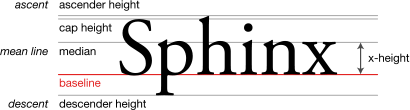
first baseline的回退對齊是start,last baseline的回退對齊是end。 space-between-
專案在交叉軸上沿對齊容器均勻分佈。每對相鄰專案之間的間距相同。第一個專案與交叉軸上對齊容器的起始邊緣齊平,最後一個專案與交叉軸上對齊容器的結束邊緣齊平。
space-around-
專案在交叉軸上沿對齊容器均勻分佈。每對相鄰專案之間的間距相同。第一個專案之前和最後一個專案之後的空白空間等於每對相鄰專案之間空間的一半。
space-evenly-
專案在交叉軸上沿對齊容器均勻分佈。每對相鄰專案之間、起始邊緣與第一個專案之間,以及結束邊緣與最後一個專案之間的間距完全相同。
stretch-
如果專案沿交叉軸的組合大小小於對齊容器的大小,則任何
auto大小的專案都會等量(而非按比例)增加其大小,同時仍尊重max-height/max-width(或等效功能)施加的約束,以便組合大小沿交叉軸正好填充對齊容器。 safe-
與對齊關鍵字一起使用。如果所選關鍵字意味著專案會溢位對齊容器導致資料丟失,則專案將改為像對齊模式為
start一樣對齊。 unsafe-
與對齊關鍵字一起使用。無論專案與對齊容器的相對大小以及是否可能發生導致資料丟失的溢位,都會遵守給定的對齊值。
正式定義
正式語法
align-content =
  normal                                   |
  <baseline-position>                      |
  <content-distribution>                   |
  <overflow-position>? <content-position>

<baseline-position> =
  [ first | last ]?  &&
  baseline

<content-distribution> =
  space-between  |
  space-around   |
  space-evenly   |
  stretch

<overflow-position> =
  unsafe  |
  safe

<content-position> =
  center      |
  start       |
  end         |
  flex-start  |
  flex-end
示例
不同 align-content 值的影響
在此示例中,您可以切換三個不同的 display 屬性值,包括 flex、grid 和 block。您還可以切換 align-content 的不同值。
HTML
<section>
  <div class="olive">Olive</div>
  <div class="coral">Coral</div>
  <div class="deepskyblue">Deep<br />sky<br />blue</div>
  <div class="orchid">Orchid</div>
  <div class="slateblue">Slateblue</div>
  <div class="maroon">Maroon</div>
</section>
CSS
section {
  border: solid 1.5px tomato;
  height: 300px;
  width: 300px;
  flex-wrap: wrap; /* used by flex only */
  gap: 0.2rem; /* not used by block */
}
.olive {
  background-color: olive;
}
.coral {
  background-color: coral;
}
.deepskyblue {
  background-color: deepskyblue;
}
.orchid {
  background-color: orchid;
}
.slateblue {
  background-color: slateblue;
  color: white;
}
.maroon {
  background-color: maroon;
  color: white;
}
結果
嘗試更改 display 值和 align-content 值。
在塊佈局中,子元素被視為單個元素,這意味著 space-between、space-around 和 space-evenly 的行為不同。
規範
| 規範 |
|---|
| CSS Box Alignment Module Level 3 # align-justify-content |
| CSS 彈性盒子佈局模組第 1 級 # align-content-property |
瀏覽器相容性
載入中…