語法
css
/* Point values */
line-height-step: 18pt;

/* Global values */
line-height-step: inherit;
line-height-step: initial;
line-height-step: revert;
line-height-step: revert-layer;
line-height-step: unset;
line-height-step 屬性指定為以下任意一種
- 一個
<length>。
值
正式定義
正式語法
line-height-step =
  <length [0,∞]>
示例
設定行框高度的步進單位
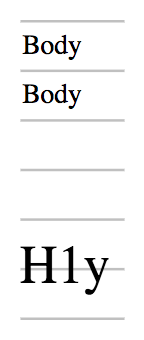
在以下示例中,每個段落的行框高度都向上舍入到步進單位。<h1> 中的行框不適合一個步進單位,因此佔用兩個,但它仍然在兩個步進單位中居中。
css
:root {
  font-size: 12pt;
  --my-grid: 18pt;
  line-height-step: var(--my-grid);
}
h1 {
  font-size: 20pt;
  margin-top: calc(2 * var(--my-grid));
}
這些規則的結果顯示在下面的截圖中
規範
目前沒有瀏覽器支援此功能。
瀏覽器相容性
載入中…