使用 CSS 計數器
CSS 計數器讓你能夠根據內容在文件中的位置來調整其外觀。例如,你可以使用計數器自動為網頁中的標題編號,或者更改有序列表的編號。
計數器本質上是由 CSS 維護的變數,其值可以透過 CSS 規則增加或減少,這些規則會跟蹤它們被使用了多少次。以下幾點會影響元素的計數器值:
- 計數器可以從父元素繼承,或從前一個兄弟元素接收。
- 新計數器透過
counter-reset屬性例項化。 - 計數器透過
counter-increment屬性遞增。 - 計數器透過
counter-set屬性直接設定為一個值。
你可以定義自己的命名計數器,也可以操作為所有有序列表預設建立的 list-item 計數器。
使用計數器
要使用計數器,必須首先使用 counter-reset 屬性將其初始化為一個值。計數器的值可以使用 counter-increment 屬性來增加或減少,也可以使用 counter-set 屬性直接設定為一個特定的值。計數器的當前值透過 counter() 或 counters() 函式顯示,通常在偽元素的 content 屬性中使用。
計數器只能在生成盒子的元素上設定、重置或遞增。例如,如果一個元素被設定為 display: none,那麼對該元素的任何計數器操作都將被忽略。
計數器的屬性可以使用樣式限制來限定作用域於特定元素,這在 contain 屬性中有更詳細的描述。
操作計數器的值
要使用 CSS 計數器,必須首先使用 counter-reset 屬性將其初始化為一個值。該屬性也可以用來將計數器值更改為任何特定的數字。
下面我們將一個名為 section 的計數器初始化為預設值 (0)。
counter-reset: section;
你也可以初始化多個計數器,並可選擇為每個計數器指定一個初始值。下面我們將 section 和 topic 計數器初始化為預設值,並將 page 計數器初始化為 3。
counter-reset: section page 3 topic;
一旦初始化,計數器的值可以使用 counter-increment 來增加或減少。例如,下面的宣告會在每個 h3 標籤上將 section 計數器加一。
h3::before {
  counter-increment: section; /* Increment the value of section counter by 1 */
}
你可以在計數器名稱後指定遞增或遞減的量。它可以是正數或負數,如果沒有提供整數,則預設為 1。
除了遞增或遞減外,計數器也可以使用 counter-set 屬性顯式地設定為一個值。
.done::before {
  counter-set: section 20;
}
計數器的名稱不能是 none、inherit 或 initial;否則該宣告將被忽略。
顯示計數器
計數器的值可以使用 counter() 或 counters() 函式在 content 屬性中顯示。
例如,下面的宣告使用 counter() 為每個 h3 標題新增字首文字 Section <number>:,其中 <number> 是十進位制計數器的值(預設顯示樣式)。
body {
  counter-reset: section; /* Set a counter named 'section', and its initial value is 0. */
}

h3::before {
  counter-increment: section; /* Increment the value of section counter by 1 */
  content: "Section " counter(section) ": "; /* Display counter value in default style (decimal) */
}
當巢狀級別的編號不包含父級的上下文時,使用 counter() 函式。例如,這裡每個巢狀級別都從 1 重新開始:
1 One
  1 Nested one
  2 Nested two
2 Two
  1 Nested one
  2 Nested two
  3 Nested three
3 Three
當巢狀級別的計數必須包含父級的計數值時,使用 counters() 函式。例如,你可以用它來佈局章節,如下所示:
1 One
  1.1 Nested one
  1.2 Nested two
2 Two
  2.1 Nested one
  2.2 Nested two
  2.3 Nested three
3 Three
counter() 函式有兩種形式:counter(<counter-name>) 和 counter(<counter-name>, <counter-style>)。生成的文字是偽元素作用域內給定名稱的最內層計數器的值。
counters() 函式也有兩種形式:counters(<counter-name>, <separator>) 和 counters(<counter-name>, <separator>, <counter-style>)。生成的文字是指定偽元素作用域內所有同名計數器的值,從最外層到最內層,由指定的字串 (<separator>) 分隔。
對於這兩種方法,計數器都以指定的 <counter-style> 渲染(預設為 decimal)。你可以使用任何 list-style-type 值或你自己的自定義樣式。
反向計數器
反向計數器是指倒數(遞減)而非正數(遞增)的計數器。反向計數器透過在 counter-reset 中命名計數器時使用 reversed() 函式表示法來建立。
反向計數器的預設初始值等於元素數量(與預設值為 0 的普通計數器不同)。這使得實現一個從元素數量倒數到 1 的計數器變得很容易。
例如,要建立一個名為 section 的具有預設初始值的反向計數器,你可以使用以下語法:
counter-reset: reversed(section);
當然,你也可以指定任何你喜歡的初始值。
透過為 counter-increment 指定一個負值來減少計數器的值。
備註: 你也可以使用 counter-increment 來遞減一個非反向計數器。使用反向計數器的主要好處是其預設的初始值,以及 list-item 計數器會自動遞減反向計數器。
計數器的繼承和傳播
每個元素或偽元素在該元素的作用域內都有一組計數器。集合中的初始計數器從元素的父元素和前一個兄弟元素接收。計數器值從前一個兄弟元素的最後一個後代、最後一個兄弟元素或父元素接收。
當一個元素宣告一個計數器時,該計數器會巢狀在從父元素接收的同名計數器內部。如果父元素沒有同名計數器,則該計數器會直接新增到元素的計數器集合中。從前一個兄弟元素接收的同名計數器會從計數器集合中移除。
counter() 函式檢索所提供名稱的最內層計數器。而 counters() 函式檢索具有給定名稱的整個計數器樹。
在下面的例子中,我們演示了一個名為 primary 的繼承計數器和一個名為 secondary 的兄弟計數器。所有的 <div> 元素都使用 counters() 函式顯示它們的計數器。請注意,所有計數器都是使用 counter-reset 屬性建立的,並且沒有一個計數器被遞增過。
<section>
counter-reset: primary 3
<div>A</div>
<div>B</div>
<div>C</div>
<div class="same-primary-name">D</div>
<span> counter-reset: primary 6</span>
<div>E</div>
<div class="new-secondary-name">F</div>
<span> counter-reset: secondary 5</span>
<div>G</div>
<div>H</div>
<div class="same-secondary-name">I </div>
<span> counter-reset: secondary 10</span>
<div>J </div>
<div>K</div>
<section></section>
</section>
/* create 'primary' counter on divs' parent */
section {
  counter-reset: primary 3;
}

div::after {
  content: " ('primary' counters: " counters(primary, "-", style)
    ", 'secondary' counters: " counters(secondary, "-", style) ")";
  color: blue;
}

/* create new 'primary' counter */
.same-primary-name {
  counter-reset: primary 6;
}

/* create 'secondary' counter on div 'F' */
.new-secondary-name {
  counter-reset: secondary 5;
}

/* override the sibling 'secondary' counter */
.same-secondary-name {
  counter-reset: secondary 10;
}
section 元素初始化了一個名為 primary、值為 3 的計數器,所有子 <div> 都接收了這個繼承的 primary 計數器。元素 'D' 建立了一個新的 primary(值為 6)計數器,它巢狀在從父元素接收的計數器中,所以該元素有兩個名為 primary 的計數器,值分別為 3 和 6。
元素 'F' 首次建立了 secondary(值為 5)計數器,並將其傳遞給下一個兄弟元素 'G'。元素 'G' 將計數器傳遞給下一個元素 'H',依此類推。接下來,元素 'I' 建立了一個同名為 secondary(值為 10)的新計數器,但它丟棄了從前一個兄弟元素 'H' 接收的 secondary(值為 5)計數器,並將其自己的計數器傳遞給 'J'。
counter-set 和 counter-reset 的區別
counter-set 屬性更新一個現有的計數器,如果不存在同名計數器,則例項化一個新的計數器。counter-reset 屬性總是建立一個新的計數器。
在下面的例子中,我們有一個父列表,內部有兩個子列表。每個列表項都使用一個名為 'item' 的計數器進行編號。第一個子列表使用 counter-set 屬性,第二個子列表使用 counter-reset 屬性來更改 'item' 計數器。
<ul class="parent">
  <li>A</li>
  <li>B</li>
  <li>
    C (the counter updated using `counter-set`)
    <ul class="sub-list-one">
      <li>sub-A</li>
      <li>sub-B</li>
    </ul>
  </li>
  <li>D</li>
  <li>
    E (a new counter created using `counter-reset`)
    <ul class="sub-list-two">
      <li>sub-A</li>
      <li>sub-B</li>
      <li>sub-C</li>
    </ul>
  </li>
  <li>F</li>
  <li>G</li>
</ul>
/* create a new counter for the first time */
.parent {
  counter-reset: item 0;
}

/* increment the counter on each list item */
li {
  counter-increment: item;
}

/* show numbers on list items */
li::before {
  content: counter(item) " ";
}

/* change the existing counter value */
.sub-list-one {
  counter-set: item 10;
}

/* change the counter value */
.sub-list-two {
  counter-reset: item 0;
}
注意第一個子列表項如何從 11 開始編號,並且編號在父列表中繼續。這是因為 counter-set 屬性更新了在 .parent 元素上宣告的同一個 'item' 計數器。然後注意第二個子列表項如何從 '1' 開始重新編號,並且它之後的父列表項沒有延續編號。這是因為 counter-reset 屬性建立了一個同名的新計數器,所以父列表項繼續使用舊的計數器。
列表項計數器
使用 <ol> 元素建立的有序列表,隱式地擁有一個名為 list-item 的計數器。
與其他計數器一樣,對於正向計數器,其預設初始值為 0;對於反向計數器,其預設值為“專案數量”。與作者建立的計數器不同,list-item 會根據計數器是否反向,為每個列表元素自動遞增或遞減一。
list-item 計數器可用於透過 CSS 操作有序列表的預設行為。例如,你可以更改預設初始值,或使用 counter-increment 來更改列表項遞增或遞減的方式。
示例
基本示例
此示例在每個標題的開頭添加了“Section [計數器的值]:”。
CSS
body {
  counter-reset: section; /* Set a counter named 'section', and its initial value is 0. */
}

h3::before {
  counter-increment: section; /* Increment the value of section counter by 1 */
  content: "Section " counter(section) ": "; /* Display the word 'Section ', the value of
                                                section counter, and a colon before the content
                                                of each h3 */
}
HTML
<h3>Introduction</h3>
<h3>Body</h3>
<h3>Conclusion</h3>
結果
基本示例:反向計數器
此示例與上面的示例相同,但使用了反向計數器。如果你的瀏覽器支援 reversed() 函式表示法,結果將如下所示:
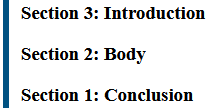
CSS
body {
  counter-reset: reversed(
    section
  ); /* Set a counter named 'section', and its initial value is 0. */
}

h3::before {
  counter-increment: section -1; /* Decrement the value of section counter by 1 */
  content: "Section " counter(section) ": "; /* Display the word 'Section ', the value of
                                                section counter, and a colon before the content
                                                of each h3 */
}
HTML
<h3>Introduction</h3>
<h3>Body</h3>
<h3>Conclusion</h3>
結果
一個更復雜的例子
計數器不必每次遞增時都顯示。此示例計算所有連結,但僅當連結沒有文字時才顯示計數器,作為一個方便的替代方案。
CSS
:root {
  counter-reset: link;
}

a[href] {
  counter-increment: link;
}

a[href]:empty::after {
  content: "[" counter(link) "]";
}
HTML
<p>See <a href="https://www.mozilla.org/"></a></p>
<p>Do not forget to <a href="contact-me.html">leave a message</a>!</p>
<p>See also <a href="https://mdn.club.tw/"></a></p>
結果
巢狀計數器示例
CSS 計數器對於製作大綱列表特別有用,因為在子元素中會自動建立計數器的新例項。使用 counters() 函式,可以在不同級別的巢狀計數器之間插入分隔文字。
CSS
ol {
  counter-reset: section; /* Creates a new instance of the
                             section counter with each ol
                             element */
  list-style-type: none;
}

li::before {
  counter-increment: section; /* Increments only this instance
                                            of the section counter */
  content: counters(section, ".") " "; /* Combines the values of all instances
                                          of the section counter, separated
                                          by a period */
}
HTML
<ol>
  <li>item</li>          <!-- 1     -->
  <li>item               <!-- 2     -->
    <ol>
      <li>item</li>      <!-- 2.1   -->
      <li>item</li>      <!-- 2.2   -->
      <li>item           <!-- 2.3   -->
        <ol>
          <li>item</li>  <!-- 2.3.1 -->
          <li>item</li>  <!-- 2.3.2 -->
        </ol>
        <ol>
          <li>item</li>  <!-- 2.3.1 -->
          <li>item</li>  <!-- 2.3.2 -->
          <li>item</li>  <!-- 2.3.3 -->
        </ol>
      </li>
      <li>item</li>      <!-- 2.4   -->
    </ol>
  </li>
  <li>item</li>          <!-- 3     -->
  <li>item</li>          <!-- 4     -->
</ol>
<ol>
  <li>item</li>          <!-- 1     -->
  <li>item</li>          <!-- 2     -->
</ol>
結果
規範
| 規範 |
|---|
| CSS 列表與計數器模組第 3 級 # 自動編號 |