刪除作者表單
本小節介紹如何定義一個頁面來刪除Author物件。
如“表單設計”部分所述,我們的策略是隻允許刪除未被其他物件引用的物件(在本例中,這意味著如果Author被Book引用,則不允許刪除)。在實現方面,這意味著表單需要在刪除作者之前確認沒有關聯的書籍。如果有關聯的書籍,則應顯示這些書籍,並說明必須先刪除這些書籍,然後才能刪除Author物件。
控制器 - 獲取路由
開啟/controllers/authorController.js。找到匯出的author_delete_get()控制器方法,並將其替換為以下程式碼。
// Display Author delete form on GET.
exports.author_delete_get = asyncHandler(async (req, res, next) => {
  // Get details of author and all their books (in parallel)
  const [author, allBooksByAuthor] = await Promise.all([
    Author.findById(req.params.id).exec(),
    Book.find({ author: req.params.id }, "title summary").exec(),
  ]);

  if (author === null) {
    // No results.
    res.redirect("/catalog/authors");
  }

  res.render("author_delete", {
    title: "Delete Author",
    author: author,
    author_books: allBooksByAuthor,
  });
});
控制器從 URL 引數(req.params.id)獲取要刪除的Author例項的 ID。它在Promise.all()返回的 Promise 上使用await來非同步等待指定的作者記錄和所有關聯的書籍(並行)。當這兩個操作都完成後,它會渲染author_delete.pug檢視,並傳遞title、author和author_books的變數。
注意:如果findById()沒有返回任何結果,則表示作者不在資料庫中。在這種情況下,無需刪除任何內容,因此我們立即重定向到所有作者的列表。
if (author === null) {
  // No results.
  res.redirect("/catalog/authors");
}
控制器 - 釋出路由
找到匯出的author_delete_post()控制器方法,並將其替換為以下程式碼。
// Handle Author delete on POST.
exports.author_delete_post = asyncHandler(async (req, res, next) => {
  // Get details of author and all their books (in parallel)
  const [author, allBooksByAuthor] = await Promise.all([
    Author.findById(req.params.id).exec(),
    Book.find({ author: req.params.id }, "title summary").exec(),
  ]);

  if (allBooksByAuthor.length > 0) {
    // Author has books. Render in same way as for GET route.
    res.render("author_delete", {
      title: "Delete Author",
      author: author,
      author_books: allBooksByAuthor,
    });
    return;
  } else {
    // Author has no books. Delete object and redirect to the list of authors.
    await Author.findByIdAndDelete(req.body.authorid);
    res.redirect("/catalog/authors");
  }
});
首先,我們驗證是否已提供 ID(這是透過表單主體引數傳送的,而不是使用 URL 中的版本)。然後,我們以與GET路由相同的方式獲取作者及其關聯的書籍。如果沒有書籍,則刪除作者物件並重定向到所有作者的列表。如果仍然存在書籍,則我們只需重新渲染表單,並傳入要刪除的作者和書籍列表。
注意:我們可以檢查對findById()的呼叫是否返回任何結果,如果未返回,則立即渲染所有作者的列表。為了簡潔起見,我們保留了上面的程式碼(如果找不到 ID,它仍然會返回作者列表,但這將在findByIdAndDelete()之後發生)。
檢視
建立/views/author_delete.pug並將下面的文字複製到其中。
extends layout

block content

  h1 #{title}: #{author.name}
  p= author.lifespan

  if author_books.length

    p #[strong Delete the following books before attempting to delete this author.]
    div(style='margin-left:20px;margin-top:20px')
      h4 Books
      dl
        each book in author_books
          dt
            a(href=book.url) #{book.title}
          dd #{book.summary}

  else
    p Do you really want to delete this Author?

    form(method='POST')
      div.form-group
        input#authorid.form-control(type='hidden', name='authorid', value=author._id )

      button.btn.btn-primary(type='submit') Delete
該檢視擴充套件了佈局模板,並覆蓋了名為content的塊。在頂部,它顯示作者詳細資訊。然後,它根據author_books的數量包含一個條件語句(if和else子句)。
- 如果作者有相關書籍,則頁面會列出這些書籍,並說明必須先刪除這些書籍,然後才能刪除此
Author。 - 如果沒有書籍,則頁面會顯示一個確認提示。
- 如果點選刪除按鈕,則作者 ID 將在
POST請求中傳送到伺服器,並且該作者的記錄將被刪除。
新增刪除控制元件
接下來,我們將向作者詳細資訊檢視新增刪除控制元件(詳細資訊頁面是從中刪除記錄的理想位置)。
注意:在完整的實現中,控制元件將僅對授權使用者可見。但是,目前我們還沒有授權系統!
開啟author_detail.pug檢視,並在底部新增以下行。
hr
p
  a(href=author.url+'/delete') Delete author
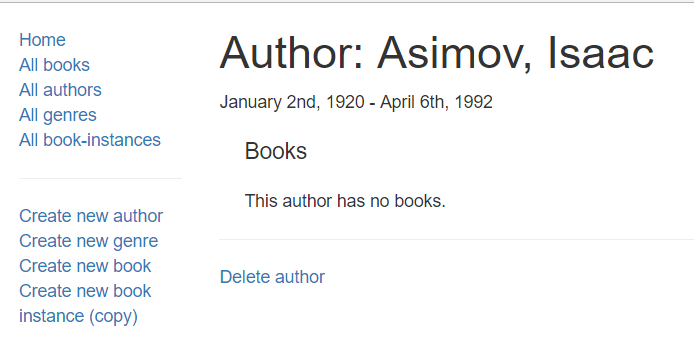
現在,該控制元件應該顯示為一個連結,如下所示,位於作者詳細資訊頁面上。
它是什麼樣子的?
執行應用程式並在瀏覽器中開啟https://:3000/。然後選擇所有作者連結,然後選擇特定作者。最後,選擇刪除作者連結。
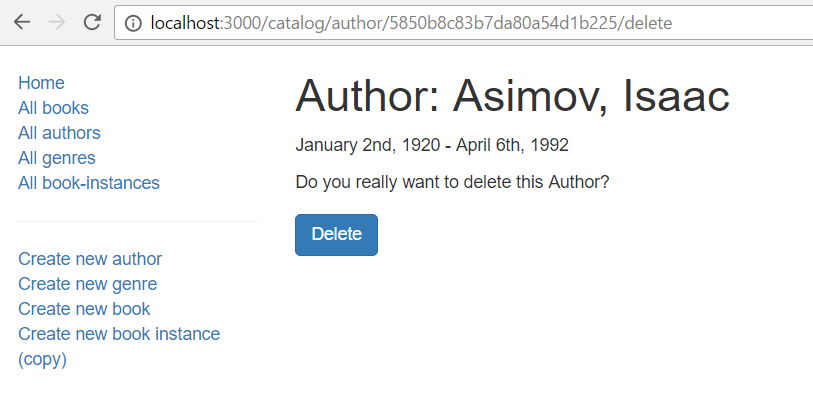
如果作者沒有書籍,您將看到如下頁面。按下刪除後,伺服器將刪除作者並重定向到作者列表。
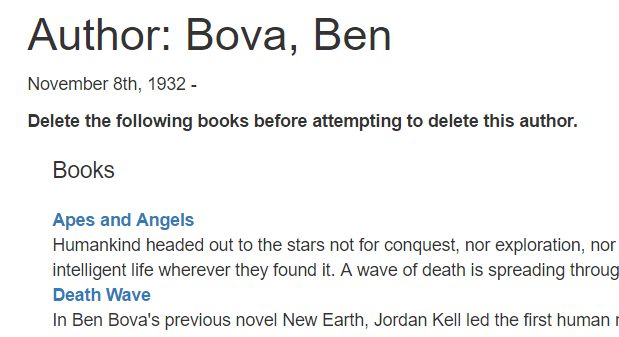
如果作者有書籍,您將看到如下檢視。然後,您可以從其詳細資訊頁面刪除書籍(一旦實現該程式碼!)。
注意:其他刪除物件頁面可以以相同的方式實現。我們將其留作挑戰。
後續步驟
- 返回Express 教程第 6 部分:使用表單。
- 繼續第 6 部分的最後一小節:更新書籍表單。