更新書籍表格
本節文章展示如何定義一個更新`Book`物件的頁面。更新書籍時的表單處理與建立書籍時的處理方式非常相似,區別在於您需要在`GET`路由中使用資料庫中的值填充表單。
控制器 - 獲取路由
開啟** /controllers/bookController.js **。找到匯出的`book_update_get()`控制器方法,並將其替換為以下程式碼。
// Display book update form on GET.
exports.book_update_get = asyncHandler(async (req, res, next) => {
  // Get book, authors and genres for form.
  const [book, allAuthors, allGenres] = await Promise.all([
    Book.findById(req.params.id).populate("author").exec(),
    Author.find().sort({ family_name: 1 }).exec(),
    Genre.find().sort({ name: 1 }).exec(),
  ]);

  if (book === null) {
    // No results.
    const err = new Error("Book not found");
    err.status = 404;
    return next(err);
  }

  // Mark our selected genres as checked.
  allGenres.forEach((genre) => {
    if (book.genre.includes(genre._id)) genre.checked = "true";
  });

  res.render("book_form", {
    title: "Update Book",
    authors: allAuthors,
    genres: allGenres,
    book: book,
  });
});
該控制器從 URL 引數 ( `req.params.id` ) 獲取要更新的`Book`的 id。它`await` `Promise.all()` 返回的 promise 以獲取指定的`Book`記錄(填充其流派和作者欄位)以及所有`Author`和`Genre`記錄。
當操作完成時,該函式檢查是否找到了任何書籍,如果沒有找到任何書籍,則將錯誤“書籍未找到”傳送到錯誤處理中介軟體。
**注意:**對於搜尋,找不到任何書籍結果**不是錯誤** - 但對於此應用程式而言,這是錯誤,因為我們知道必須存在匹配的書籍記錄!上面的程式碼在回撥中比較了 ( `book===null` ) ,但它也可以同樣地將方法 orFail() 連線到查詢中。
然後,我們將當前選擇的流派標記為選中,並渲染**book_form.pug**檢視,傳遞`title`、book、所有`authors`和所有`genres`的變數。
控制器 - 釋出路由
找到匯出的`book_update_post()`控制器方法,並將其替換為以下程式碼。
// Handle book update on POST.
exports.book_update_post = [
  // Convert the genre to an array.
  (req, res, next) => {
    if (!Array.isArray(req.body.genre)) {
      req.body.genre =
        typeof req.body.genre === "undefined" ? [] : [req.body.genre];
    }
    next();
  },

  // Validate and sanitize fields.
  body("title", "Title must not be empty.")
    .trim()
    .isLength({ min: 1 })
    .escape(),
  body("author", "Author must not be empty.")
    .trim()
    .isLength({ min: 1 })
    .escape(),
  body("summary", "Summary must not be empty.")
    .trim()
    .isLength({ min: 1 })
    .escape(),
  body("isbn", "ISBN must not be empty").trim().isLength({ min: 1 }).escape(),
  body("genre.*").escape(),

  // Process request after validation and sanitization.
  asyncHandler(async (req, res, next) => {
    // Extract the validation errors from a request.
    const errors = validationResult(req);

    // Create a Book object with escaped/trimmed data and old id.
    const book = new Book({
      title: req.body.title,
      author: req.body.author,
      summary: req.body.summary,
      isbn: req.body.isbn,
      genre: typeof req.body.genre === "undefined" ? [] : req.body.genre,
      _id: req.params.id, // This is required, or a new ID will be assigned!
    });

    if (!errors.isEmpty()) {
      // There are errors. Render form again with sanitized values/error messages.

      // Get all authors and genres for form
      const [allAuthors, allGenres] = await Promise.all([
        Author.find().sort({ family_name: 1 }).exec(),
        Genre.find().sort({ name: 1 }).exec(),
      ]);

      // Mark our selected genres as checked.
      for (const genre of allGenres) {
        if (book.genre.indexOf(genre._id) > -1) {
          genre.checked = "true";
        }
      }
      res.render("book_form", {
        title: "Update Book",
        authors: allAuthors,
        genres: allGenres,
        book: book,
        errors: errors.array(),
      });
      return;
    } else {
      // Data from form is valid. Update the record.
      const updatedBook = await Book.findByIdAndUpdate(req.params.id, book, {});
      // Redirect to book detail page.
      res.redirect(updatedBook.url);
    }
  }),
];
這與建立`Book`時使用的 post 路由非常相似。首先,我們驗證和清理來自表單的書籍資料,並使用它建立一個新的`Book`物件(將其`_id`值設定為要更新的物件的 id)。如果驗證資料時出現錯誤,我們將重新渲染表單,並額外顯示使用者輸入的資料、錯誤以及流派和作者列表。如果沒有錯誤,我們將呼叫`Book.findByIdAndUpdate()`來更新`Book`文件,然後重定向到其詳細資訊頁面。
檢視
無需更改表單的檢視(** /views/book_form.pug **),因為同一個模板適用於建立和更新書籍。
新增一個更新按鈕
開啟**book_detail.pug**檢視,並確保頁面底部有用於刪除和更新書籍的連結,如下所示。
  hr
  p
    a(href=book.url+'/delete') Delete Book
  p
    a(href=book.url+'/update') Update Book
您現在應該能夠從“書籍詳細資訊”頁面更新書籍。
它看起來像什麼?
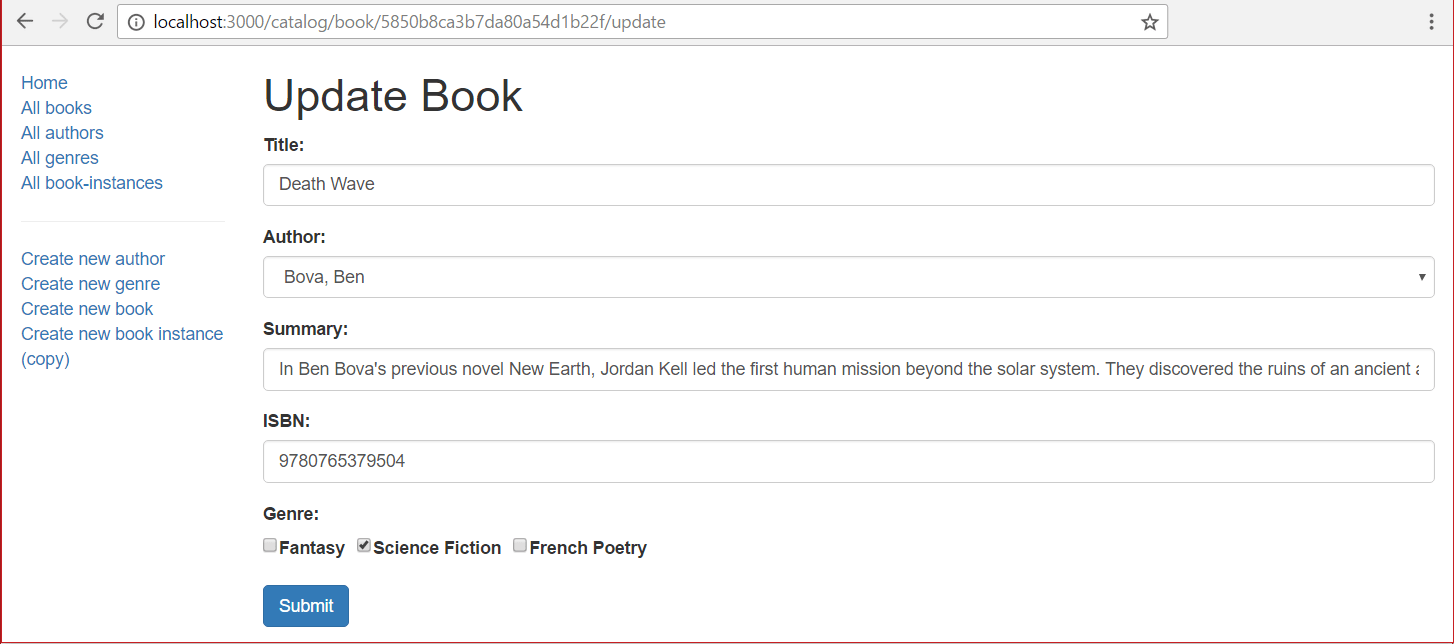
執行應用程式,在瀏覽器中開啟`https://:3000/`,選擇“所有書籍”連結,然後選擇特定書籍。最後,選擇“更新書籍”連結。
該表單應與“建立書籍”頁面看起來完全一樣,只是標題為“更新書籍”,並且預先填充了記錄值。
**注意:**更新其他物件的頁面可以用相同的方式實現。我們把它留作一個挑戰。