使用 userScripts
警告:這是已棄用的 userScripts API 的文件。它在 Manifest V2 的 Firefox 中可用。有關在 Manifest V3 中支援使用者指令碼的功能,請參閱新的 userScripts API。
透過實現 userScripts,擴充套件開發者可以修改站點的外觀和/或功能,以更好地滿足使用者需求。
按照以下步驟在您的擴充套件中實現 userScripts
- 在擴充套件的 manifest 中使用
"user_scripts"鍵定義指令碼。 - 註冊 userScript
- 實現 userScript 函式
讓我們透過一個小型示例 Web 擴充套件來逐步瞭解這些過程。該示例可在 GitHub 上的 webextensions-examples 倉庫中找到。
userScripts Manifest
userScript 由擴充套件 manifest 的 user_scripts 鍵的內容標識。user_scripts 鍵的最低資訊是
  "user_scripts": {
    "api_script": "customUserScriptAPIs.js"
  }
"api_script" 屬性指示包含 userScript 程式碼的 JavaScript 檔案的路徑。
載入示例擴充套件
下載示例後
導航到 about:debugging,點選 **Load Temporary Add-on…**,然後雙擊擴充套件的 manifest。
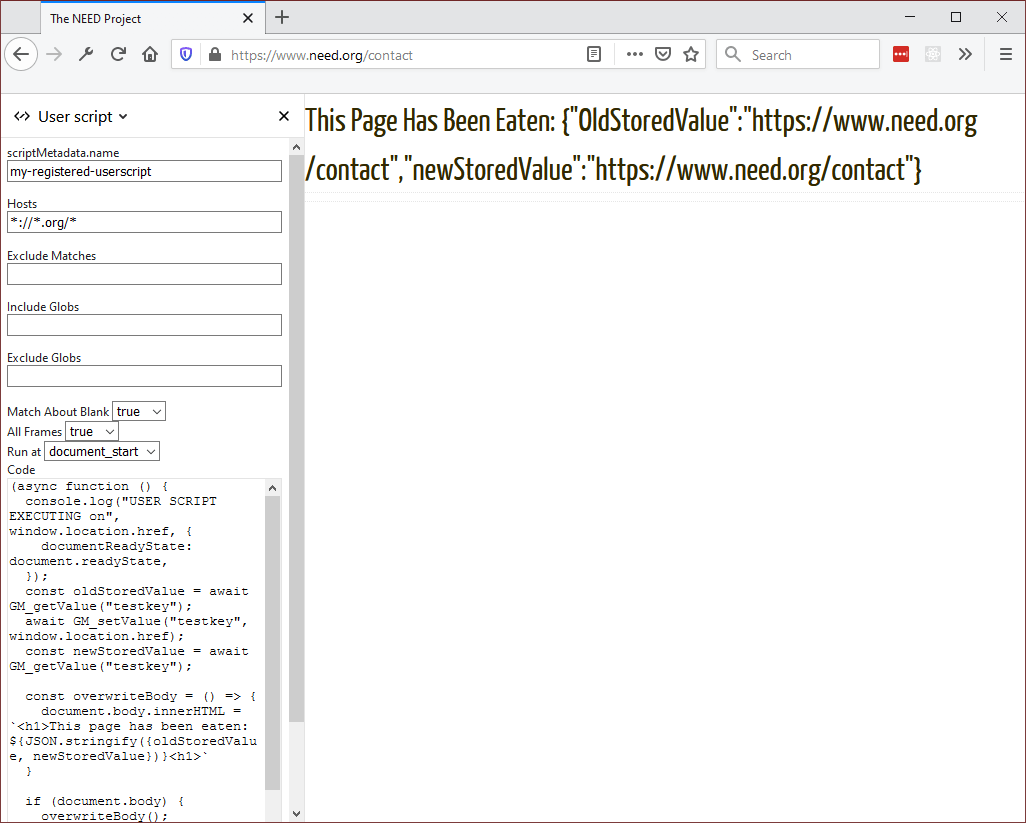
示例中包含的預設程式碼允許您載入一個 userScript,該指令碼將“吃掉”與 Hosts 條目匹配的頁面的內容。在點選面板底部的 **Register script** 按鈕之前,請進行任何您想做的更改。
在下面的圖片中,該擴充套件將“吃掉”域名以 .org 結尾的頁面的內容。這是此擴充套件的預設行為。
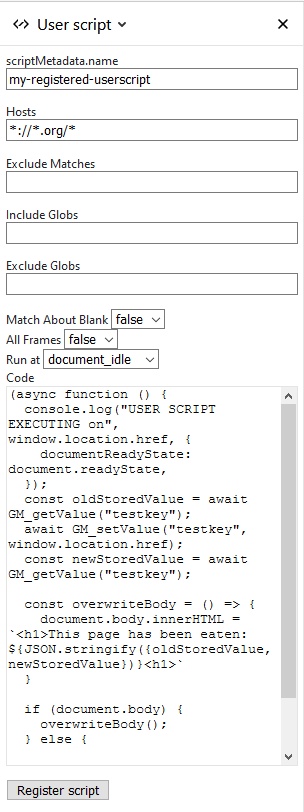
在您點選 **Register script** 按鈕之前,什麼都不會發生。該按鈕將根據此對話方塊上的設定實現 user script。這意味著您可以嘗試指令碼的行為,而無需自己實現擴充套件。
註冊 userScript
在 userScript 可以執行之前,必須使用 userScripts.register() 方法對其進行註冊。以下是註冊示例擴充套件的程式碼
async function registerScript() {
  const params = {
    hosts: stringToArray(hostsInput.value),
    code: codeInput.value,
    excludeMatches: stringToArray(excludeMatchesInput.value),
    includeGlobs: stringToArray(includeGlobsInput.value),
    excludeGlobs: stringToArray(excludeGlobsInput.value),
    runAt: runAtInput.value,
    matchAboutBlank: stringToBool(matchAboutBlankInput.value),
    allFrames: stringToBool(allFramesInput.value),
    scriptMetadata: { name: scriptNameInput.value || null },
  };

  // Store the last submitted values to the extension storage
  // (so that they can be restored when the popup is opened
  // the next time).
  await browser.storage.local.set({
    lastSetValues: params,
  });

  try {
    // Clear the last userScripts.register result.
    lastResultEl.textContent = "";

    await browser.runtime.sendMessage(params);
    lastResultEl.textContent = "UserScript successfully registered";
    // Clear the last userScripts.register error.
    lastErrorEl.textContent = "";

    // Clear the last error stored.
    await browser.storage.local.remove("lastError");
  } catch (e) {
    // There was an error on registering the userScript,
    // let's show the error message in the popup and store
    // the last error into the extension storage.

    const lastError = `${e}`;
    // Show the last userScripts.register error.
    lastErrorEl.textContent = lastError;

    // Store the last error.
    await browser.storage.local.set({ lastError });
  }
}
此程式碼首先初始化 params 物件,以便將值傳遞給 userScripts.register 方法。
實現 userScript 函式
指令碼註冊後,導航到一個域名以 .org 結尾的頁面,您將看到類似以下內容