theme_experiment
| 型別 | Object |
|---|---|
| 必填 | 否 |
| Manifest 版本 | 2 或更高 |
| 示例 |
json |
此鍵支援為 Firefox 介面定義實驗性的 theme 鍵屬性。這些實驗是提議新主題功能並將其包含在 Firefox 中的先驅。實驗透過
- 建立樣式表來完成,該樣式表定義了 Firefox UI 元素內部 CSS 選擇器與任意 CSS 變數之間的對映。然後,在
colors、images和properties物件中將 CSS 變數對映到新的theme鍵屬性。 - (不使用樣式表)使用
colors、images和properties將 Firefox 內部 CSS 選擇器(如--arrowpanel-dimmed)對映到新的theme鍵屬性。此選項將實驗限制在與內建 CSS 變數關聯的 UI 元件。
要發現 Firefox UI 元素或 Firefox 內部 CSS 變數的 CSS 選擇器,請使用 瀏覽器工具箱。
注意:此鍵僅適用於 Firefox Developer Edition 和 Firefox Nightly 渠道,並且需要啟用 extensions.experiments.enabled 首選項。在 Firefox 73 及更早版本中,則必須改用 extensions.legacy.enabled。
警告:此功能是實驗性的,可能會發生更改。
語法
theme_experiment 鍵是一個物件,它接受以下屬性
| 名稱 | 型別 | 描述 |
|---|---|---|
stylesheet(樣式表) |
String |
可選 提供 Firefox UI 元素 CSS 選擇器到 CSS 變數對映的樣式表名稱。 |
images |
Object |
可選 將 CSS 變數(在 Firefox 中定義或由 |
colors |
Object |
可選 將 CSS 變數(在 Firefox 中定義或由 |
properties |
Object |
可選 將 CSS 變數(在 Firefox 中定義或由 |
示例
此示例使用名為 style.css 的樣式表,以便能夠為 theme 鍵中的瀏覽器重新載入按鈕設定顏色。
樣式表定義了
#reload-button {
  fill: var(--reload-button-color);
}
其中 #reload-button 是 Firefox 中重新載入按鈕的內部 CSS 選擇器,--reload-button-color 是一個任意名稱。
在 manifest.json 檔案中,--reload-button-color 然後被對映到 theme 的 colors 屬性中使用的名稱。
"theme_experiment": {
  "stylesheet": "style.css",
  "colors": {
    "reload_button": "--reload-button-color"
  }
}
reload_button 引數的使用方式與其他 theme 屬性相同。
"theme": {
  "colors": {
    "reload_button": "orange"
  }
}
這將使重新載入圖示變為橙色。
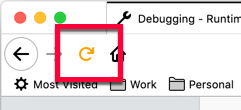
此屬性也可在 browser.theme.update() 中使用。images 和 properties 的工作方式與 colors 類似。
瀏覽器相容性
載入中…