<thead>:表格頭部元素
Baseline 廣泛可用 *
<thead> HTML 元素用於封裝一組表格行(<tr> 元素),表示它們構成表格的頭部,包含有關表格列的資訊。這通常以列標題(<th> 元素)的形式出現。
試一試
<table>
  <caption>
    Council budget (in £) 2018
  </caption>
  <thead>
    <tr>
      <th scope="col">Items</th>
      <th scope="col">Expenditure</th>
    </tr>
  </thead>
  <tbody>
    <tr>
      <th scope="row">Donuts</th>
      <td>3,000</td>
    </tr>
    <tr>
      <th scope="row">Stationery</th>
      <td>18,000</td>
    </tr>
  </tbody>
  <tfoot>
    <tr>
      <th scope="row">Totals</th>
      <td>21,000</td>
    </tr>
  </tfoot>
</table>
thead,
tfoot {
  background-color: #2c5e77;
  color: white;
}

tbody {
  background-color: #e4f0f5;
}

table {
  border-collapse: collapse;
  border: 2px solid rgb(140 140 140);
  font-family: sans-serif;
  font-size: 0.8rem;
  letter-spacing: 1px;
}

caption {
  caption-side: bottom;
  padding: 10px;
}

th,
td {
  border: 1px solid rgb(160 160 160);
  padding: 8px 10px;
}

td {
  text-align: center;
}
屬性
此元素包含全域性屬性。
已棄用屬性
以下屬性已棄用,不應使用。它們僅在更新現有程式碼時作為參考和出於歷史興趣而在此處記錄。
align已棄用-
指定每個表頭單元格的水平對齊方式。可能的列舉值包括
left、center、right、justify和char。如果支援,char值會根據char屬性中定義的字元以及charoff屬性定義的偏移量來對齊文字內容。請改用text-alignCSS 屬性,因為此屬性已棄用。 bgcolor已棄用-
定義每個表頭單元格的背景顏色。該值是 HTML 顏色;可以是帶
#字首的6 位十六進位制 RGB 程式碼,也可以是顏色關鍵字。不支援其他 CSS<color>值。請改用background-colorCSS 屬性,因為此屬性已棄用。 char已棄用-
不執行任何操作。它最初旨在指定每個表頭單元格內容與某個字元的對齊方式。如果
align未設定為char,則此屬性將被忽略。 charoff已棄用-
不執行任何操作。它最初旨在指定表頭單元格內容與
char屬性指定的對齊字元之間的字元偏移量。 valign已棄用-
指定每個表頭單元格的垂直對齊方式。可能的列舉值包括
baseline、bottom、middle和top。請改用vertical-alignCSS 屬性,因為此屬性已棄用。
用法說明
示例
請參閱 <table> 以獲取一個完整的表格示例,其中介紹了常見的標準和最佳實踐。
基本表頭結構
此示例演示了一個表格,該表格分為帶列標題的頭部部分和帶表格主要資料的正文部分。
HTML
<thead> 和 <tbody> 元素用於將表格行結構化為語義部分。<thead> 元素表示表格的頭部部分,其中包含一行(<tr>)列標題單元格(<th>)。
<table>
  <thead>
    <tr>
      <th>Student ID</th>
      <th>Name</th>
      <th>Major</th>
      <th>Credits</th>
    </tr>
  </thead>
  <tbody>
    <tr>
      <td>3741255</td>
      <td>Jones, Martha</td>
      <td>Computer Science</td>
      <td>240</td>
    </tr>
    <tr>
      <td>3971244</td>
      <td>Nim, Victor</td>
      <td>Russian Literature</td>
      <td>220</td>
    </tr>
    <tr>
      <td>4100332</td>
      <td>Petrov, Alexandra</td>
      <td>Astrophysics</td>
      <td>260</td>
    </tr>
  </tbody>
</table>
CSS
使用一些基本的 CSS 來設定表格頭部的樣式和突出顯示,以便列標題在表格正文資料中脫穎而出。
thead {
  border-bottom: 2px solid rgb(160 160 160);
  text-align: center;
  background-color: #2c5e77;
  color: white;
}

tbody {
  background-color: #e4f0f5;
}
結果
多行表頭
此示例演示了一個具有兩行的表格頭部部分。
HTML
在此示例中,我們透過在 <thead> 元素中包含兩行表格行(<tr>),從而建立了一個多行表格頭部,擴充套件了基本示例中的表格標記。我們添加了一個額外的列,將學生姓名分為姓氏和名字。
<table>
  <thead>
    <tr>
      <th rowspan="2">Student ID</th>
      <th colspan="2">Student</th>
      <th rowspan="2">Major</th>
      <th rowspan="2">Credits</th>
    </tr>
    <tr>
      <th>First name</th>
      <th>Last name</th>
    </tr>
  </thead>
  <tbody>
    <tr>
      <td>3741255</td>
      <td>Martha</td>
      <td>Jones</td>
      <td>Computer Science</td>
      <td>240</td>
    </tr>
    <tr>
      <td>3971244</td>
      <td>Victor</td>
      <td>Nim</td>
      <td>Russian Literature</td>
      <td>220</td>
    </tr>
    <tr>
      <td>4100332</td>
      <td>Alexandra</td>
      <td>Petrov</td>
      <td>Astrophysics</td>
      <td>260</td>
    </tr>
  </tbody>
</table>
單元格跨度
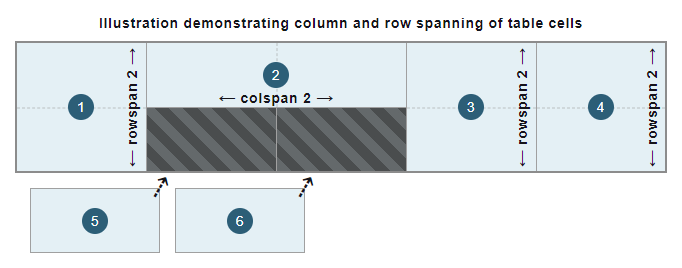
為了將標題單元格與正確的列和行關聯和對齊,在 <th> 元素上使用了 colspan 和 rowspan 屬性。這些屬性中設定的值指定了每個標題單元格(<th>)跨越多少個單元格。由於這些屬性的設定方式,第二行的兩個標題單元格與它們所對應的列對齊。它們各自跨越一行和一列,因為 colspan 和 rowspan 屬性的預設值都為 1。
此示例演示的列和行跨度如下圖所示
CSS
CSS 與上一個示例保持不變。
結果
技術摘要
規範
| 規範 |
|---|
| HTML # 表頭元素 |
瀏覽器相容性
載入中…
另見
- 學習:HTML 表格基礎
<caption>,<col>,<colgroup>,<table>,<tbody>,<td>,<tfoot>,<th>,<tr>: 其他表格相關元素background-color: 設定每個表頭單元格背景色的 CSS 屬性border: 控制表頭單元格邊框的 CSS 屬性text-align: 水平對齊每個表頭單元格內容的 CSS 屬性vertical-align: 垂直對齊每個表頭單元格內容的 CSS 屬性