<td>: 表格資料單元格元素
Baseline 廣泛可用 *
試一試
<table>
  <caption>
    Alien football stars
  </caption>
  <tr>
    <th scope="col">Player</th>
    <th scope="col">Gloobles</th>
    <th scope="col">Za'taak</th>
  </tr>
  <tr>
    <th scope="row">TR-7</th>
    <td>7</td>
    <td>4,569</td>
  </tr>
  <tr>
    <th scope="row">Khiresh Odo</th>
    <td>7</td>
    <td>7,223</td>
  </tr>
  <tr>
    <th scope="row">Mia Oolong</th>
    <td>9</td>
    <td>6,219</td>
  </tr>
</table>
th,
td {
  border: 1px solid rgb(160 160 160);
  padding: 8px 10px;
}

th[scope="col"] {
  background-color: #505050;
  color: white;
}

th[scope="row"] {
  background-color: #d6ecd4;
}

td {
  text-align: center;
}

tr:nth-of-type(even) {
  background-color: #eeeeee;
}

table {
  border-collapse: collapse;
  border: 2px solid rgb(140 140 140);
  font-family: sans-serif;
  font-size: 0.8rem;
  letter-spacing: 1px;
}

caption {
  caption-side: bottom;
  padding: 10px;
}
屬性
此元素包含全域性屬性。
已棄用屬性
以下屬性已棄用,不應使用。它們僅在更新現有程式碼時作為參考和出於歷史興趣而在此處記錄。
abbr已棄用-
包含資料單元格內容的簡短縮寫描述。一些使用者代理(例如螢幕閱讀器)可能會在內容本身之前呈現此描述。將縮寫內容放入單元格中,並將(較長的)描述放在
title屬性中,因為此屬性已棄用。或者,最好將內容包含在資料單元格中,並使用 CSS 視覺上剪裁溢位的文字。 align已棄用-
指定資料單元格的水平對齊方式。可能的列舉值為
left、center、right、justify和char。如果支援,char值將文字內容對齊到char屬性中定義的字元,並根據charoff屬性定義的偏移量對齊。請改用text-alignCSS 屬性,因為此屬性已棄用。 axis已棄用-
包含一個以空格分隔的字串列表,每個字串對應於資料單元格適用的單元格組的
id屬性。 bgcolor已棄用-
定義資料單元格的背景顏色。該值是 HTML 顏色;可以是 6 位十六進位制 RGB 程式碼,字首為
#,也可以是 顏色關鍵字。不支援其他 CSS<color>值。請改用background-colorCSS 屬性,因為此屬性已棄用。 char已棄用-
不執行任何操作。它最初旨在指定資料單元格內容與字元的對齊方式。當嘗試對齊數字或貨幣值時,典型值包括句點 (
.)。如果align未設定為char,則忽略此屬性。 charoff已棄用-
不執行任何操作。它最初旨在指定資料單元格內容相對於
char屬性指定的對齊字元的偏移字元數。 height已棄用-
定義推薦的資料單元格高度。請改用
heightCSS 屬性,因為此屬性已棄用。 scope已棄用-
定義標頭(在
<th>元素中定義)關聯的單元格。可能的列舉值為row、col、rowgroup和colgroup。此屬性僅與<th>元素一起使用,以定義其作為標頭的行或列,因為此屬性對於<td>元素已棄用。 valign已棄用-
指定資料單元格的垂直對齊方式。可能的列舉值為
baseline、bottom、middle和top。請改用vertical-alignCSS 屬性,因為此屬性已棄用。 width已棄用-
定義推薦的資料單元格寬度。請改用
widthCSS 屬性,因為此屬性已棄用。
用法說明
示例
請參閱 <table> 以獲取一個完整的表格示例,其中介紹了常見的標準和最佳實踐。
基本資料單元格
此示例使用 <td> 元素以及其他與表格相關的元素來介紹一個包含關於語音字母表資料的基本表格。
HTML
一些表格行(<tr> 元素)同時包含標題單元格(<th> 元素)和資料單元格 <td> 元素。每行的第一個子元素 <th> 元素構成了表格的第一列,每個 <th> 為該行內的資料單元格提供行標題。每個對應的 <td> 元素都包含與其各自的列標題和行標題單元格對齊的資料。
注意:通常,會實現帶有列標題的表頭組,以便更容易理解列中的資訊。將使用 <thead> 和 <tbody> 元素將這些標題行和資料行分組到相應的表頭和表體部分。為了專注於資料單元格並降低本示例的複雜性,本示例未實現此功能。
<table>
  <tr>
    <th scope="row">A</th>
    <td>Alfa</td>
    <td>AL fah</td>
  </tr>
  <tr>
    <th scope="row">B</th>
    <td>Bravo</td>
    <td>BRAH voh</td>
  </tr>
  <tr>
    <th scope="row">C</th>
    <td>Charlie</td>
    <td>CHAR lee</td>
  </tr>
  <tr>
    <th scope="row">D</th>
    <td>Delta</td>
    <td>DELL tah</td>
  </tr>
</table>
CSS
使用一些基本 CSS 來設定表格及其單元格的樣式。CSS 屬性選擇器和 :nth-of-type 偽類用於交替單元格的外觀,以使表格中的資訊更易於理解和識別。
td,
th {
  border: 1px solid rgb(160 160 160);
  padding: 8px 10px;
}

tr:nth-of-type(odd) td {
  background-color: #eeeeee;
}

tr th[scope="row"] {
  background-color: #d6ecd4;
}
結果
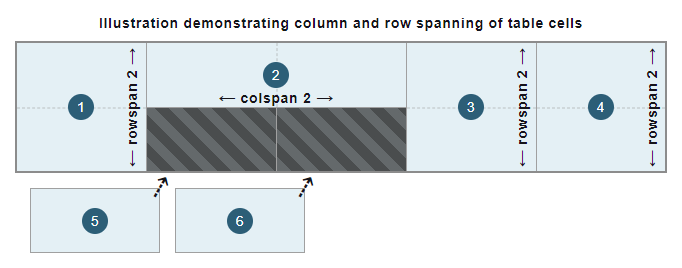
列和行跨越
此示例透過新增一個額外的“ABC”單元格來擴充套件和增強 上一個示例 中的基本表格。
HTML
在第一行(<tr> 元素)中引入了一個額外的資料單元格 (<td> 元素)。這在表格中建立了第四列。
使用 rowspan 屬性,“ABC”單元格跨越了表格的前三行。後續行的最後一個數據單元格每個都跨越兩列。這是透過使用 colspan 屬性完成的,使其在表格結構中正確對齊。請注意,為了說明這一點,表格中添加了一個額外的行(<tr> 元素)。
<table>
  <tr>
    <th scope="row">A</th>
    <td>Alfa</td>
    <td>AL fah</td>
    <td rowspan="3">ABC</td>
  </tr>
  <tr>
    <th scope="row">B</th>
    <td>Bravo</td>
    <td>BRAH voh</td>
  </tr>
  <tr>
    <th scope="row">C</th>
    <td>Charlie</td>
    <td>CHAR lee</td>
  </tr>
  <tr>
    <th scope="row">D</th>
    <td>Delta</td>
    <td colspan="2">DELL tah</td>
  </tr>
  <tr>
    <th scope="row">E</th>
    <td>Echo</td>
    <td colspan="2">ECK oh</td>
  </tr>
</table>
CSS
CSS 中使用 :first-of-type 和 :last-of-type 偽類來選擇和設定新增的“ABC”資料單元格的樣式。
tr:first-of-type td:last-of-type {
  width: 60px;
  background-color: #505050;
  color: white;
  font-weight: bold;
  text-align: center;
}

td,
th {
  border: 1px solid rgb(160 160 160);
  padding: 8px 10px;
}

tr:nth-of-type(odd) td {
  background-color: #eeeeee;
}

tr th[scope="row"] {
  background-color: #d6ecd4;
}
結果
將資料單元格與標題單元格關聯
對於資料單元格 (<td> 元素) 和標題單元格 (<th> 元素) 之間更復雜的關係,單獨使用帶有 scope 屬性的 <th> 元素可能不足以滿足輔助技術(尤其是螢幕閱讀器)的需求。
HTML
為了提高 上一個示例 的可訪問性,並允許螢幕閱讀器(例如)讀出與每個資料單元格關聯的標題,可以引入 headers 屬性以及 id 屬性。與“ABC”資料單元格關聯的每個行標題單元格(<th> 元素),即字母“A”、“B”和“C”,都使用 id 屬性賦予唯一識別符號。然後,“ABC”資料單元格 (<td> 元素) 使用這些 id 值作為 headers 屬性的空格分隔列表。
<table>
  <tr>
    <th id="a" scope="row">A</th>
    <td>Alfa</td>
    <td>AL fah</td>
    <td headers="a b c" rowspan="3">ABC</td>
  </tr>
  <tr>
    <th id="b" scope="row">B</th>
    <td>Bravo</td>
    <td>BRAH voh</td>
  </tr>
  <tr>
    <th id="c" scope="row">C</th>
    <td>Charlie</td>
    <td>CHAR lee</td>
  </tr>
  <tr>
    <th scope="row">D</th>
    <td>Delta</td>
    <td colspan="2">DELL tah</td>
  </tr>
  <tr>
    <th scope="row">E</th>
    <td>Echo</td>
    <td colspan="2">ECK oh</td>
  </tr>
</table>
結果
雖然 視覺結果 與 上一個示例表格 保持不變,但現在每個資料單元格 (<td>) 都明確地與其行標題單元格 (<th>) 相關聯。
技術摘要
規範
| 規範 |
|---|
| HTML # the-td-element |
瀏覽器相容性
載入中…
另見
- 學習:HTML 表格基礎
<caption>、<col>、<colgroup>、<table>、<tbody>、<tfoot>、<th>、<thead>、<tr>:其他與表格相關的元素background-color:設定每個資料單元格背景顏色的 CSS 屬性border:控制資料單元格邊框的 CSS 屬性height:控制推薦資料單元格高度的 CSS 屬性text-align:水平對齊每個資料單元格內容的 CSS 屬性vertical-align:垂直對齊每個資料單元格內容的 CSS 屬性width:控制推薦資料單元格寬度的 CSS 屬性:nth-of-type、:first-of-type、:last-of-type:選擇所需資料單元格的 CSS 偽類