ARIA 即時區域
使用 JavaScript,可以在不重新載入整個頁面的情況下動態更改頁面的部分內容——例如,即時更新搜尋結果列表,或顯示一個不需要使用者互動的、不顯眼的警報或通知。雖然這些更改通常對能看到頁面的使用者來說是顯而易見的,但對於使用輔助技術的使用者來說可能並不明顯。ARIA 即時區域填補了這一空白,提供了一種以可被輔助技術播報的方式來以程式設計方式公開動態內容更改的方法。
注意:輔助技術通常只會播報即時區域內容中發生的動態更改。只要在更改發生之前新增 aria-live 屬性或專門的即時區域 role(例如 role="status"),就能使您希望播報更改的元素得到播報,無論是透過原始的 HTML 標記,還是透過 JavaScript 動態新增。先有一個空的即時區域,然後——在另一個獨立的步驟中——更改區域內的內容。儘管規範中沒有明確說明,但瀏覽器/輔助技術對 role="alert" 進行了特殊的處理:在大多數情況下,即使區域(已包含通知/訊息)存在於頁面初始標記中,或被動態注入到頁面中,role="alert" 區域內的內容也會被播報。但是,請注意,根據具體的瀏覽器/輔助技術組合,role="alert" 區域在播報時會自動加上“警報”的字首。
即時區域
在不重新載入頁面的情況下更新的動態內容通常是區域或控制元件。非互動的簡單內容更改應標記為即時區域。即時區域透過 aria-live 屬性明確表示。
aria-live:aria-live=POLITENESS_SETTING 用於設定螢幕閱讀器處理即時區域更新的優先順序——可能設定為:off、polite 或 assertive。此屬性是迄今為止最重要的。
通常,只使用 aria-live="polite"。任何接收重要更新但又不過於頻繁以免造成干擾的區域都應具有此屬性。螢幕閱讀器將在使用者空閒時播報更改。
aria-live="assertive" 應僅用於時間敏感/關鍵通知,這些通知絕對需要使用者立即關注。通常,對斷言性即時區域的更改會中斷螢幕閱讀器當前正在進行的任何播報。因此,它可能非常令人煩擾和干擾,應僅謹慎使用。
出乎意料的是,aria-live="off" 並不表示不應播報更改。當一個元素的 aria-live="off"(或具有此隱式值的 role,例如 role="marquee" 或 role="timer")時,只有當焦點位於元素上或元素內部時,才應該播報該元素內容的更改。
基本示例:下拉框更新有用的螢幕資訊
一家專門提供行星資訊的網站提供了一個下拉框。當從下拉框中選擇一個行星時,頁面上的一個區域將更新所選行星的資訊。
<fieldset>
  <legend>Planet information</legend>
  <label for="planetsSelect">Planet:</label>
  <select id="planetsSelect" aria-controls="planetInfo">
    <option value="">Select a planet…</option>
    <option value="mercury">Mercury</option>
    <option value="venus">Venus</option>
    <option value="earth">Earth</option>
    <option value="mars">Mars</option>
  </select>
  <button id="renderPlanetInfoButton">Go</button>
</fieldset>

<div role="region" id="planetInfo" aria-live="polite">
  <h2 id="planetTitle">No planet selected</h2>
  <p id="planetDescription">Select a planet to view its description</p>
</div>

<p>
  <small>
    Information from
    <a href="https://en.wikipedia.org/wiki/Solar_System">Wikipedia</a>
  </small>
</p>
const PLANETS_INFO = {
  mercury: {
    title: "Mercury",
    description:
      "Mercury is the smallest and innermost planet in the Solar System. It is named after the Roman deity Mercury, the messenger to the gods.",
  },

  venus: {
    title: "Venus",
    description:
      "Venus is the second planet from the Sun. It is named after the Roman goddess of love and beauty.",
  },

  earth: {
    title: "Earth",
    description:
      "Earth is the third planet from the Sun and the only object in the Universe known to harbor life.",
  },

  mars: {
    title: "Mars",
    description:
      'Mars is the fourth planet from the Sun and the second-smallest planet in the Solar System after Mercury. In English, Mars carries a name of the Roman god of war, and is often referred to as the "Red Planet".',
  },
};

function renderPlanetInfo(planet) {
  const planetTitle = document.querySelector("#planetTitle");
  const planetDescription = document.querySelector("#planetDescription");

  if (planet in PLANETS_INFO) {
    planetTitle.textContent = PLANETS_INFO[planet].title;
    planetDescription.textContent = PLANETS_INFO[planet].description;
  } else {
    planetTitle.textContent = "No planet selected";
    planetDescription.textContent = "Select a planet to view its description";
  }
}

const renderPlanetInfoButton = document.querySelector(
  "#renderPlanetInfoButton",
);

renderPlanetInfoButton.addEventListener("click", (event) => {
  const planetsSelect = document.querySelector("#planetsSelect");
  const selectedPlanet =
    planetsSelect.options[planetsSelect.selectedIndex].value;

  renderPlanetInfo(selectedPlanet);
});
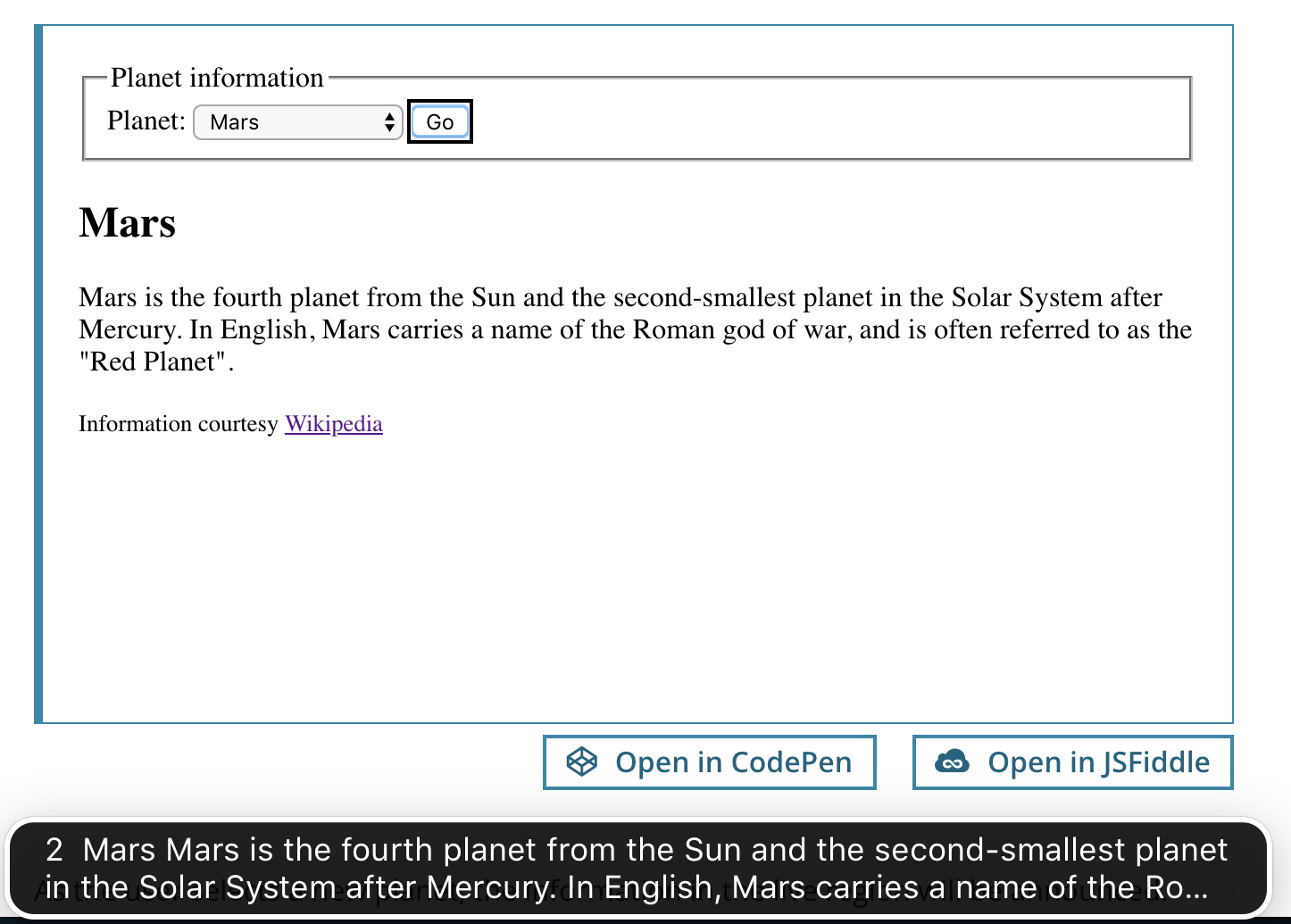
當用戶選擇新行星時,即時區域中的資訊將被播報。由於即時區域具有 aria-live="polite",螢幕閱讀器將在使用者暫停時等待,然後播報更新。因此,在列表中向下滾動並選擇另一個行星不會播報即時區域的更新。即時區域的更新僅為最終選擇的行星播報。
這是 VoiceOver 在 Mac 上播報即時區域更新(透過字幕)的截圖
具有隱式即時區域屬性的角色
具有以下 role="…" 值的元素預設充當即時區域
| 角色 | 描述 | 相容性說明 |
|---|---|---|
| log | 聊天、錯誤、遊戲或其他型別的日誌 | 為獲得最大的相容性,在使用此角色時新增一個冗餘的 aria-live="polite"。 |
| status | 狀態列或螢幕區域,提供某種型別的更新狀態。螢幕閱讀器使用者有專門的命令來讀取當前狀態。 | 為獲得最大的相容性,在使用此角色時新增一個冗餘的 aria-live="polite"。 |
| alert | 閃爍在螢幕上的錯誤或警告訊息。警報對於客戶端驗證通知尤為重要。 警報示例。 | 為了獲得最大的相容性,有些人建議在使用此角色時新增一個冗餘的 aria-live="assertive"。然而,同時新增 aria-live 和 role="alert" 會在 iOS 版 VoiceOver 中導致重複播報問題。 |
| progressbar | 介於控制元件和即時區域之間的混合體。與 aria-valuemin、aria-valuemax 和 aria-valuenow 一起使用。(待定:此處新增更多資訊)。 |
|
| marquee | 滾動的文字,例如股票行情顯示器。 | |
| timer | 任何型別的計時器或時鐘,例如倒計時器或秒錶讀數。 |
附加的即時區域屬性
即時區域得到了很好的支援。The Paciello Group 在 2014 年釋出了 關於即時區域支援情況的資訊。Paul J. Adam 研究了 aria-atomic 和 aria-relevant 的支援情況。
-
aria-atomic:aria-atomic=BOOLEAN用於設定螢幕閱讀器是否應始終將即時區域作為一個整體呈現,即使只有部分割槽域發生更改。可能設定為:false或true。預設設定為false。 -
:
aria-relevant=[LIST_OF_CHANGES]用於設定哪些型別的更改/更新與即時區域相關。可能設定為一個或多個:additions、removals、text、all。預設設定為:additions text。
基本示例:aria-atomic
為了說明 aria-atomic,請考慮一個顯示小時和分鐘的基本時鐘網站。時鐘每分鐘更新一次,新的剩餘時間會覆蓋當前內容。
<div id="clock" role="timer" aria-live="polite">
  <span id="clock-hours"></span>
  <span id="clock-mins"></span>
</div>
/* basic JavaScript to update the clock */
function updateClock() {
  const now = new Date();
  document.getElementById("clock-hours").textContent = now.getHours();
  document.getElementById("clock-mins").textContent =
    `0${now.getMinutes()}`.slice(-2);
}

/* first run */
updateClock();

/* update every minute */
setInterval(updateClock, 60000);
函式第一次執行時,將新增的字串的全部內容都將播報。在後續呼叫中,只播報與先前內容相比已更改的部分。例如,當時鍾從“17:33”變為“17:34”時,輔助技術只會播報“34”,這對使用者來說用處不大。
解決此問題的一種方法是首先清除即時區域的所有內容(在本例中,將 <span id="clock-hours"> 和 <span id="clock-mins"> 的 innerHTML 設定為空),然後注入新內容。然而,這有時可能不可靠,因為它取決於這兩個更新的確切時間。
aria-atomic="true" 可確保每次更新即時區域時,都會完整地播報所有內容(例如,“17:34”)。
<div id="clock" role="timer" aria-live="polite" aria-atomic="true">…</div>
aria-atomic 的另一個示例——使用者操作的結果更新/通知。
<div id="date-input">
  <label for="year">Year:</label>
  <input type="text" id="year" value="1990" />
</div>

<div id="date-output" aria-atomic="true" aria-live="polite">
  The set year is:
  <span id="year-output">1990</span>
</div>
function change(event) {
  const yearOut = document.getElementById("year-output");

  switch (event.target.id) {
    case "year":
      yearOut.textContent = event.target.value;
      break;
  }
}

document.getElementById("year").addEventListener("blur", change);
如果不設定 aria-atomic="true",螢幕閱讀器只播報年份的更改值。設定 aria-atomic="true" 後,螢幕閱讀器播報“設定的年份是:更改值”
基本示例:aria-relevant
使用 aria-relevant,您可以指定哪些型別的更改/更新應播報到即時區域。
例如,考慮一個聊天網站,它希望顯示當前登入使用者的列表。我們不僅想播報當前登入的使用者,還希望在使用者從列表中移除時觸發一個特定的播報。透過指定 aria-relevant="additions removals" 可以實現這一點。
<ul id="roster" aria-live="polite" aria-relevant="additions removals">
  <!-- use JavaScript to add and remove users here -->
</ul>
ARIA 即時屬性細分
aria-live="polite"表示螢幕閱讀器應等待使用者空閒後再向使用者呈現更新。這是最常用的值,因為使用“assertive”打斷使用者可能會影響其流程。aria-atomic未設定(預設為false),因此每次只播報新增或移除的使用者,而不是整個名單。aria-relevant="additions removals"確保會播報新增到名單或從名單移除的使用者。