Promise
Baseline 廣泛可用 *
Promise 物件代表一個非同步操作的最終完成(或失敗)及其結果值。
要了解 Promise 的工作原理以及如何使用它們,建議您先閱讀使用 Promise。
描述
Promise 是一個值的代理,該值在建立 Promise 時不一定已知。它允許你將處理程式與非同步操作的最終成功值或失敗原因關聯起來。這使得非同步方法可以像同步方法一樣返回值:非同步方法不是立即返回最終值,而是返回一個 promise,以便在未來的某個時間點提供該值。
一個 Promise 處於以下狀態之一:
- 待定 (pending):初始狀態,既未完成也未拒絕。
- 已完成 (fulfilled):意味著操作成功完成。
- 已拒絕 (rejected):意味著操作失敗。
一個待定 Promise 的最終狀態 可以是帶有值的已完成,也可以是帶有原因(錯誤)的已拒絕。當出現這兩種情況之一時,透過 Promise 的 then 方法排隊的關聯處理程式就會被呼叫。如果 Promise 在關聯的處理程式被新增時已經已完成或已拒絕,則處理程式將被呼叫,因此非同步操作完成與其處理程式被新增之間沒有競爭條件。
如果 Promise 已完成或已拒絕,但不是待定狀態,則稱其為已敲定 (settled)。
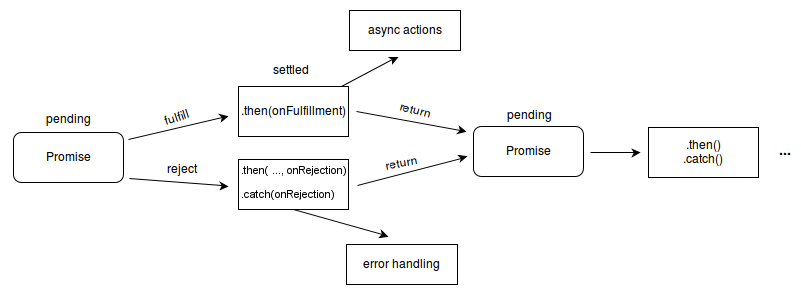
你還會聽到“已解決 (resolved)”一詞用於 Promise——這意味著 Promise 已經敲定,或者“鎖定”為匹配另一個 Promise 的最終狀態,並且進一步解決或拒絕它沒有效果。原始 Promise 提案中的 States and fates 文件包含有關 Promise 術語的更多細節。口語中,“已解決”的 Promise 通常等同於“已完成”的 Promise,但正如“States and fates”中所示,已解決的 Promise 也可以是待定或已拒絕的。例如:
new Promise((resolveOuter) => {
  resolveOuter(
    new Promise((resolveInner) => {
      setTimeout(resolveInner, 1000);
    }),
  );
});
這個 Promise 在建立時就已經已解決(因為 resolveOuter 是同步呼叫的),但它是用另一個 Promise 解決的,因此直到 1 秒後內部 Promise 完成時才會被完成。實際上,“解決”通常在幕後完成,不可觀察,只有其完成或拒絕才可觀察。
注意:其他一些語言也有延遲計算和推遲計算的機制,它們也稱之為“Promise”,例如 Scheme。JavaScript 中的 Promise 表示已經發生的程序,可以與回撥函式鏈式呼叫。如果你想延遲評估一個表示式,可以考慮使用一個沒有引數的函式,例如 f = () => expression 來建立延遲評估的表示式,然後使用 f() 來立即評估表示式。
Promise 本身沒有用於取消的一等協議,但你可能能夠直接取消底層的非同步操作,通常使用 AbortController。
鏈式 Promise
Promise 方法 then()、catch() 和 finally() 用於將後續操作與已敲定的 Promise 關聯起來。then() 方法最多接受兩個引數;第一個引數是 Promise 完成情況的回撥函式,第二個引數是拒絕情況的回撥函式。catch() 和 finally() 方法在內部呼叫 then(),使錯誤處理不那麼冗長。例如,catch() 實際上只是一個不傳遞完成處理程式的 then()。由於這些方法返回 Promise,它們可以被鏈式呼叫。例如:
const myPromise = new Promise((resolve, reject) => {
  setTimeout(() => {
    resolve("foo");
  }, 300);
});

myPromise
  .then(handleFulfilledA, handleRejectedA)
  .then(handleFulfilledB, handleRejectedB)
  .then(handleFulfilledC, handleRejectedC);
我們將使用以下術語:初始 Promise 是呼叫 then 的 Promise;新 Promise 是 then 返回的 Promise。傳遞給 then 的兩個回撥分別稱為完成處理程式和拒絕處理程式。
初始 Promise 的敲定狀態決定了執行哪個處理程式。
- 如果初始 Promise 已完成,則使用完成值呼叫完成處理程式。
- 如果初始 Promise 已拒絕,則使用拒絕原因呼叫拒絕處理程式。
處理程式的完成決定了新 Promise 的敲定狀態。
- 如果處理程式返回一個thenable值,則新 Promise 以返回值的相同狀態敲定。
- 如果處理程式返回一個非 thenable 值,則新 Promise 以返回值完成。
- 如果處理程式丟擲錯誤,則新 Promise 以丟擲的錯誤拒絕。
- 如果初始 Promise 沒有關聯的相應處理程式,則新 Promise 將以與初始 Promise 相同的狀態敲定——也就是說,如果沒有拒絕處理程式,被拒絕的 Promise 將以相同的原因保持拒絕狀態。
例如,在上面的程式碼中,如果 myPromise 拒絕,則會呼叫 handleRejectedA,如果 handleRejectedA 正常完成(沒有丟擲或返回被拒絕的 Promise),則第一個 then 返回的 Promise 將被完成而不是保持拒絕。因此,如果必須立即處理錯誤,但我們希望在鏈中保持錯誤狀態,則必須在拒絕處理程式中丟擲某種型別的錯誤。另一方面,在沒有立即需要的情況下,我們可以將錯誤處理推遲到最終的 catch() 處理程式。
myPromise
  .then(handleFulfilledA)
  .then(handleFulfilledB)
  .then(handleFulfilledC)
  .catch(handleRejectedAny);
對於回撥函式使用箭頭函式,Promise 鏈的實現可能如下所示:
myPromise
  .then((value) => `${value} and bar`)
  .then((value) => `${value} and bar again`)
  .then((value) => `${value} and again`)
  .then((value) => `${value} and again`)
  .then((value) => {
    console.log(value);
  })
  .catch((err) => {
    console.error(err);
  });
注意:為了更快的執行,所有同步操作最好在一個處理程式內完成,否則將需要幾個時間片(tick)才能按順序執行所有處理程式。
JavaScript 維護一個任務佇列。每次,JavaScript 從佇列中取出一個任務並執行它直到完成。任務由 Promise() 建構函式的執行器、傳遞給 then 的處理程式或任何返回 Promise 的平臺 API 定義。鏈中的 Promise 表示這些任務之間的依賴關係。當一個 Promise 敲定後,與其關聯的相應處理程式將被新增到任務佇列的末尾。
一個 Promise 可以參與多個鏈。對於以下程式碼,promiseA 的完成將導致 handleFulfilled1 和 handleFulfilled2 都被新增到任務佇列中。因為 handleFulfilled1 首先註冊,它將首先被呼叫。
const promiseA = new Promise(myExecutorFunc);
const promiseB = promiseA.then(handleFulfilled1, handleRejected1);
const promiseC = promiseA.then(handleFulfilled2, handleRejected2);
一個動作可以分配給一個已經敲定的 Promise。在這種情況下,該動作會立即新增到任務佇列的末尾,並在所有現有任務完成後執行。因此,對一個已經“敲定”的 Promise 的動作只會在當前同步程式碼完成後,並且至少經過一個事件迴圈(loop-tick)後才發生。這保證了 Promise 動作是非同步的。
const promiseA = new Promise((resolve, reject) => {
  resolve(777);
});
// At this point, "promiseA" is already settled.
promiseA.then((val) => console.log("asynchronous logging has val:", val));
console.log("immediate logging");

// produces output in this order:
// immediate logging
// asynchronous logging has val: 777
Thenable
在 Promise 成為語言的一部分之前,JavaScript 生態系統已經有了多種 Promise 實現。儘管它們在內部表示方式不同,但所有類 Promise 物件至少都實現了 Thenable 介面。一個 thenable 實現 .then() 方法,該方法接受兩個回撥:一個用於 Promise 完成時,一個用於 Promise 拒絕時。Promise 也是 thenable。
為了與現有的 Promise 實現互操作,該語言允許使用 thenable 代替 Promise。例如,Promise.resolve 不僅會解決 Promise,還會追蹤 thenable。
const thenable = {
  then(onFulfilled, onRejected) {
    onFulfilled({
      // The thenable is fulfilled with another thenable
      then(onFulfilled, onRejected) {
        onFulfilled(42);
      },
    });
  },
};

Promise.resolve(thenable); // A promise fulfilled with 42
Promise 併發
Promise 類提供了四個靜態方法來方便非同步任務的併發:
Promise.all()-
當所有 Promise 都完成時完成;當任何一個 Promise 拒絕時拒絕。
Promise.allSettled()-
當所有 Promise 都敲定時完成。
Promise.any()-
當任何一個 Promise 完成時完成;當所有 Promise 都拒絕時拒絕。
Promise.race()-
當任何一個 Promise 敲定時敲定。換句話說,當任何一個 Promise 完成時完成;當任何一個 Promise 拒絕時拒絕。
所有這些方法都接受一個 Promise 的可迭代物件(確切地說是thenable)並返回一個新的 Promise。它們都支援子類化,這意味著它們可以在 Promise 的子類上呼叫,結果將是子類型別的 Promise。為此,子類的建構函式必須實現與 Promise() 建構函式相同的簽名——接受一個可以以 resolve 和 reject 回撥作為引數呼叫的單一 executor 函式。子類還必須有一個 resolve 靜態方法,可以像 Promise.resolve() 一樣呼叫,以將值解析為 Promise。
請注意,JavaScript 本質上是單執行緒的,因此在給定瞬間,只有一個任務會執行,儘管控制可以在不同的 Promise 之間切換,使得 Promise 的執行看起來是併發的。JavaScript 中的並行執行只能透過工作執行緒來實現。
建構函式
Promise()-
建立一個新的
Promise物件。該建構函式主要用於包裝尚不支援 Promise 的函式。
靜態屬性
Promise[Symbol.species]-
返回用於從 Promise 方法構造返回值的建構函式。
靜態方法
Promise.all()-
接受一個 Promise 的可迭代物件作為輸入,並返回一個單一的
Promise。當所有輸入的 Promise 都完成時(包括傳遞空可迭代物件時),這個返回的 Promise 會完成,其值為一個包含所有完成值的陣列。當任何一個輸入的 Promise 拒絕時,它會以第一個拒絕原因拒絕。 Promise.allSettled()-
接受一個 Promise 的可迭代物件作為輸入,並返回一個單一的
Promise。當所有輸入的 Promise 都敲定(包括傳遞空可迭代物件時),這個返回的 Promise 會完成,其值為一個描述每個 Promise 結果的物件的陣列。 Promise.any()-
接受一個 Promise 的可迭代物件作為輸入,並返回一個單一的
Promise。當任何一個輸入的 Promise 完成時,這個返回的 Promise 會以第一個完成值完成。當所有輸入的 Promise 都拒絕時(包括傳遞空可迭代物件時),它會以一個包含拒絕原因陣列的AggregateError拒絕。 Promise.race()-
接受一個 Promise 的可迭代物件作為輸入,並返回一個單一的
Promise。這個返回的 Promise 會以第一個敲定的 Promise 的最終狀態敲定。 Promise.reject()-
返回一個新的
Promise物件,該物件以給定的原因拒絕。 Promise.resolve()-
返回一個用給定值解決的
Promise物件。如果該值是一個 thenable(即,有一個then方法),則返回的 Promise 將“跟隨”該 thenable,採用其最終狀態;否則,返回的 Promise 將用該值完成。 Promise.try()-
接受一個任何型別的回撥(同步或非同步返回或丟擲),並將其結果包裝在
Promise中。 Promise.withResolvers()-
返回一個物件,其中包含一個新的
Promise物件以及兩個用於解決或拒絕它的函式,對應於傳遞給Promise()建構函式的執行器的兩個引數。
例項屬性
這些屬性在 Promise.prototype 上定義,並由所有 Promise 例項共享。
Promise.prototype.constructor-
建立例項物件的建構函式。對於
Promise例項,初始值是Promise建構函式。 Promise.prototype[Symbol.toStringTag]-
[Symbol.toStringTag]屬性的初始值是字串"Promise"。此屬性用於Object.prototype.toString()。
例項方法
Promise.prototype.catch()-
將拒絕處理程式回撥新增到 Promise,並返回一個新的 Promise,如果呼叫回撥,則解析為回撥的返回值,如果 Promise 完成,則解析為原始完成值。
Promise.prototype.finally()-
將一個處理程式附加到 Promise,並返回一個當原始 Promise 解決時解決的新 Promise。無論 Promise 完成還是拒絕,都會呼叫該處理程式。
Promise.prototype.then()-
將完成和拒絕處理程式附加到 Promise,並返回一個解析為被呼叫處理程式的返回值的新 Promise,如果 Promise 未被處理(即,如果相關的處理程式
onFulfilled或onRejected不是函式),則解析為原始敲定值。
示例
基本示例
在此示例中,我們使用 setTimeout(...) 來模擬非同步程式碼。實際上,你可能會使用類似 XHR 或 HTML API 的東西。
const myFirstPromise = new Promise((resolve, reject) => {
  // We call resolve(...) when what we were doing asynchronously
  // was successful, and reject(...) when it failed.
  setTimeout(() => {
    resolve("Success!"); // Yay! Everything went well!
  }, 250);
});

myFirstPromise.then((successMessage) => {
  // successMessage is whatever we passed in the resolve(...) function above.
  // It doesn't have to be a string, but if it is only a succeed message, it probably will be.
  console.log(`Yay! ${successMessage}`);
});
不同情況的示例
此示例展示了使用 Promise 功能的各種技術和可能發生的各種情況。要理解這一點,請從程式碼塊底部開始,檢查 Promise 鏈。在提供初始 Promise 後,可以跟隨一系列 Promise。該鏈由 .then() 呼叫組成,通常(但不一定)在末尾有一個單一的 .catch(),可選地後跟 .finally()。在此示例中,Promise 鏈由自定義編寫的 new Promise() 構造啟動;但在實際實踐中,Promise 鏈通常從返回 Promise 的 API 函式(由其他人編寫)開始。
示例函式 tetheredGetNumber() 展示了 Promise 生成器在設定非同步呼叫時、在回撥中或兩者中都會使用 reject()。函式 promiseGetWord() 說明了 API 函式如何以自包含的方式生成並返回 Promise。
請注意,函式 troubleWithGetNumber() 以 throw 結尾。這是強制性的,因為 Promise 鏈會遍歷所有 .then() Promise,即使在發生錯誤之後,如果沒有 throw,錯誤看起來就會“被修復”。這很麻煩,因此,通常在整個 .then() Promise 鏈中省略 onRejected,而只在最終的 catch() 中有一個單一的 onRejected。
此程式碼可以在 NodeJS 下執行。透過檢視實際發生的錯誤可以增強理解。要強制更多錯誤發生,請更改 threshold 值。
// To experiment with error handling, "threshold" values cause errors randomly
const THRESHOLD_A = 8; // can use zero 0 to guarantee error

function tetheredGetNumber(resolve, reject) {
  setTimeout(() => {
    const randomInt = Date.now();
    const value = randomInt % 10;
    if (value < THRESHOLD_A) {
      resolve(value);
    } else {
      reject(new RangeError(`Too large: ${value}`));
    }
  }, 500);
}

function determineParity(value) {
  const isOdd = value % 2 === 1;
  return { value, isOdd };
}

function troubleWithGetNumber(reason) {
  const err = new Error("Trouble getting number", { cause: reason });
  console.error(err);
  throw err;
}

function promiseGetWord(parityInfo) {
  return new Promise((resolve, reject) => {
    const { value, isOdd } = parityInfo;
    if (value >= THRESHOLD_A - 1) {
      reject(new RangeError(`Still too large: ${value}`));
    } else {
      parityInfo.wordEvenOdd = isOdd ? "odd" : "even";
      resolve(parityInfo);
    }
  });
}

new Promise(tetheredGetNumber)
  .then(determineParity, troubleWithGetNumber)
  .then(promiseGetWord)
  .then((info) => {
    console.log(`Got: ${info.value}, ${info.wordEvenOdd}`);
    return info;
  })
  .catch((reason) => {
    if (reason.cause) {
      console.error("Had previously handled error");
    } else {
      console.error(`Trouble with promiseGetWord(): ${reason}`);
    }
  })
  .finally((info) => console.log("All done"));
高階示例
這個小例子展示了 Promise 的機制。每次點選 <button> 時都會呼叫 testPromise() 方法。它建立一個 Promise,該 Promise 將使用 setTimeout() 在隨機的 1-3 秒內完成為 Promise 計數(從 1 開始的數字)。Promise() 建構函式用於建立 Promise。
Promise 的完成透過使用 p1.then() 設定的完成回撥進行記錄。一些日誌顯示了方法的同步部分如何與 Promise 的非同步完成解耦。
透過在短時間內多次點選按鈕,你甚至會看到不同的 Promise 一個接一個地完成。
HTML
<button id="make-promise">Make a promise!</button>
<div id="log"></div>
JavaScript
"use strict";

let promiseCount = 0;

function testPromise() {
  const thisPromiseCount = ++promiseCount;
  const log = document.getElementById("log");
  // begin
  log.insertAdjacentHTML("beforeend", `${thisPromiseCount}) Started<br>`);
  // We make a new promise: we promise a numeric count of this promise,
  // starting from 1 (after waiting 3s)
  const p1 = new Promise((resolve, reject) => {
    // The executor function is called with the ability
    // to resolve or reject the promise
    log.insertAdjacentHTML(
      "beforeend",
      `${thisPromiseCount}) Promise constructor<br>`,
    );
    // This is only an example to create asynchronism
    setTimeout(
      () => {
        // We fulfill the promise
        resolve(thisPromiseCount);
      },
      Math.random() * 2000 + 1000,
    );
  });

  // We define what to do when the promise is resolved with the then() call,
  // and what to do when the promise is rejected with the catch() call
  p1.then((val) => {
    // Log the fulfillment value
    log.insertAdjacentHTML("beforeend", `${val}) Promise fulfilled<br>`);
  }).catch((reason) => {
    // Log the rejection reason
    console.log(`Handle rejected promise (${reason}) here.`);
  });
  // end
  log.insertAdjacentHTML("beforeend", `${thisPromiseCount}) Promise made<br>`);
}

const btn = document.getElementById("make-promise");
btn.addEventListener("click", testPromise);
結果
使用 XHR 載入影像
下面展示了另一個使用 Promise 和 XMLHttpRequest 載入影像的示例。每個步驟都已註釋,讓你可以密切關注 Promise 和 XHR 架構。
function imgLoad(url) {
  // Create new promise with the Promise() constructor;
  // This has as its argument a function with two parameters, resolve and reject
  return new Promise((resolve, reject) => {
    // XHR to load an image
    const request = new XMLHttpRequest();
    request.open("GET", url);
    request.responseType = "blob";
    // When the request loads, check whether it was successful
    request.onload = () => {
      if (request.status === 200) {
        // If successful, resolve the promise by passing back the request response
        resolve(request.response);
      } else {
        // If it fails, reject the promise with an error message
        reject(
          Error(
            `Image didn't load successfully; error code: + ${request.statusText}`,
          ),
        );
      }
    };
    // Handle network errors
    request.onerror = () => reject(new Error("There was a network error."));
    // Send the request
    request.send();
  });
}

// Get a reference to the body element, and create a new image object
const body = document.querySelector("body");
const myImage = new Image();
const imgUrl =
  "https://mdn.github.io/shared-assets/images/examples/round-balloon.png";

// Call the function with the URL we want to load, then chain the
// promise then() method with two callbacks
imgLoad(imgUrl).then(
  (response) => {
    // The first runs when the promise resolves, with the request.response
    // specified within the resolve() method.
    const imageURL = URL.createObjectURL(response);
    myImage.src = imageURL;
    body.appendChild(myImage);
  },
  (error) => {
    // The second runs when the promise
    // is rejected, and logs the Error specified with the reject() method.
    console.log(error);
  },
);
當前設定物件跟蹤
設定物件是一個環境,它在 JavaScript 程式碼執行時提供額外資訊。這包括 Realm 和模組對映,以及 HTML 特定資訊,例如來源。跟蹤當前設定物件是為了確保瀏覽器知道在給定使用者程式碼片段中使用哪個物件。
為了更好地理解這一點,我們可以仔細看看 Realm 可能是一個問題的地方。Realm 大致可以看作是全域性物件。Realm 的獨特之處在於它們包含執行 JavaScript 程式碼所需的所有必要資訊。這包括像 Array 和 Error 這樣的物件。每個設定物件都有自己的這些“副本”,並且它們不共享。這可能導致與 Promise 相關的一些意外行為。為了解決這個問題,我們跟蹤一個稱為當前設定物件的東西。它表示特定於負責某個函式呼叫的使用者程式碼上下文的資訊。
為了進一步說明這一點,我們可以看看文件中嵌入的 <iframe> 如何與其宿主通訊。由於所有 Web API 都知道當前設定物件,因此以下內容將在所有瀏覽器中工作:
<!doctype html>
<iframe></iframe>
<!-- we have a realm here -->
<script>
  // we have a realm here as well
  const bound = frames[0].postMessage.bind(frames[0], "some data", "*");
  // bound is a built-in function — there is no user
  // code on the stack, so which realm do we use?
  setTimeout(bound);
  // this still works, because we use the youngest
  // realm (the incumbent) on the stack
</script>
同樣的概念也適用於 Promise。如果我們將上面的例子稍作修改,我們會得到以下結果:
<!doctype html>
<iframe></iframe>
<!-- we have a realm here -->
<script>
  // we have a realm here as well
  const bound = frames[0].postMessage.bind(frames[0], "some data", "*");
  // bound is a built in function — there is no user
  // code on the stack — which realm do we use?
  Promise.resolve(undefined).then(bound);
  // this still works, because we use the youngest
  // realm (the incumbent) on the stack
</script>
如果我們修改這個例子,讓文件中的 <iframe> 監聽 post 訊息,我們可以觀察到當前設定物件的效果:
<!-- y.html -->
<!doctype html>
<iframe src="x.html"></iframe>
<script>
  const bound = frames[0].postMessage.bind(frames[0], "some data", "*");
  Promise.resolve(undefined).then(bound);
</script>
<!-- x.html -->
<!doctype html>
<script>
  window.addEventListener("message", (event) => {
    document.querySelector("#text").textContent = "hello";
    // this code will only run in browsers that track the incumbent settings object
    console.log(event);
  });
</script>
在上面的例子中,<iframe> 的內部文字只有在跟蹤當前設定物件時才會更新。這是因為如果不跟蹤當前設定物件,我們可能會使用錯誤的環境來發送訊息。
注意:目前,當前 realm 跟蹤在 Firefox 中已完全實現,在 Chrome 和 Safari 中有部分實現。
規範
| 規範 |
|---|
| ECMAScript® 2026 語言規範 # sec-promise-objects |
瀏覽器相容性
載入中…
另見
core-js中Promise的 Polyfill- 使用 Promise 指南
- Promises/A+ 規範
- web.dev 上的JavaScript Promises:簡介(2013)
- Domenic Denicola 的幻燈片演示回撥、Promise 和協程:JavaScript 中非同步程式設計的演變(2011)