RTCRemoteOutboundRtpStreamStats: localId 屬性
RTCRemoteOutboundRtpStreamStats 字典中的 localId 屬性是一個字串,可用於標識 RTCInboundRtpStreamStats 物件,該物件的 remoteId 與此值匹配。
這兩個物件共同提供了關於同一同步源 (SSRC) 的入站和出站兩側的統計資訊。
值
一個字串,可以與 RTCInboundRtpStreamStats 物件的 remoteId 屬性值進行比較,以確定這兩個物件是否代表本地對等方接收的同一組資料的兩側統計資訊。
用法說明
您可以將同一 RTP 流的本地檢視和遠端檢視視為成對,每對都包含指向另一方的引用。因此,如果 RTCStatsReport 包含一個 remote-outbound-rtp 統計資訊物件(型別為 RTCRemoteOutboundRtpStreamStats),它還應該有一個對應的 inbound-rtp 物件。這兩者都提供了關於從遠端對等方傳輸到本地裝置的資料包集的資訊。
區別在於,remote-outbound-rtp 從遠端對等方的角度描述了其傳送資料的統計資訊,而 inbound-rtp 則從本地對等方的角度提供了傳入資料的統計資訊。
示例
在此示例中,我們有一對函式:第一個函式 networkTestStart() 捕獲初始報告,第二個函式 networkTestStop() 捕獲第二個報告。第二個函式使用這兩個報告輸出來顯示一些有關網路狀況的資訊。
networkTestStart()
此函式呼叫 RTCPeerConnection 方法 getStats() 來請求 RTCStatsReport 並將其儲存在變數 startReport 中。
let startReport;

async function networkTestStart(pc) {
  if (pc) {
    startReport = await pc.getStats();
  }
}
給定一個 RTCPeerConnection 例項 pc,它會呼叫其 getStats() 方法來獲取一個統計報告物件,並將其儲存在 startReport 中,供 networkTestStop() 收集完測試結束資料後使用。
networkTestStop()
networkTestStop() 函式獲取第二個報告 endReport,然後計算並輸出結果。
查詢配對的統計資訊
型別為 remote-outbound-rtp(描述遠端對等方傳送資料給本地對等方的統計資訊)的每個統計記錄都有一個對應的型別為 inbound-rtp 的記錄,該記錄描述了本地對等方對在兩個對等方之間移動的相同資料的看法。讓我們建立一個實用函式來幫助我們查詢配對統計資訊物件中的鍵值。
下面顯示的 findReportEntry() 函式會檢查一個 RTCStatsReport,並返回包含指定 key 的 RTCStatsReport 基礎統計記錄——並且該鍵具有指定的 value。如果未找到匹配項,或者統計報告沒有與 key 指示的統計類別相對應的記錄。
function findReportEntry(report, key, value) {
  for (const stats of report.values()) {
    if (stats[key] === value) {
      return stats;
    }
  }
  return null;
}
由於 RTCStatsReport 是一個 JavaScript Map,我們可以迭代 Map 的 values() 來檢查報告中的每個 RTCStats 基礎統計記錄,直到找到一個具有指定 value 的 key 屬性的記錄。找到匹配項時,將返回統計物件。
如果未找到匹配項,則函式返回 null。
主函式 networkTestStop()
現在我們來看看 networkTestStop() 函式本身。它以正在測試的 RTCPeerConnection 作為輸入,呼叫 getStats() 獲取包含當前統計資訊的新的 RTCStatsReport,然後計算它正在查詢的結果,並將這些結果透過追加適當的 HTML 到類名為 stats-box 的 <div> 元素的內容中,適當地顯示給使用者。
async function networkTestStop(pc) {
  if (pc) {
    const statsBox = document.querySelector(".stats-box");
    const endReport = await pc.getStats();

    for (const endRemoteOutbound of endReport.values()) {
      if (endRemoteOutbound.type === "remote-outbound-rtp") {
        const startRemoteOutbound = startReport.get(endRemoteOutbound.id);

        if (startRemoteOutbound) {
          const startInboundStats = findReportEntry(
            startReport,
            "remoteId",
            startRemoteOutbound.id,
          );
          const endInboundStats = findReportEntry(
            endReport,
            "remoteId",
            endRemoteOutbound.id,
          );
          // Elapsed time in seconds
          const elapsedTime =
            (endRemoteOutbound.timestamp - startRemoteOutbound.timestamp) /
            1000;
          const packetsSent =
            endRemoteOutbound.packetsSent - startRemoteOutbound.packetsSent;
          const bytesSent =
            endRemoteOutbound.bytesSent - startRemoteOutbound.bytesSent;
          const framesDecoded =
            endInboundStats.framesDecoded - startInboundStats.framesDecoded;
          const frameRate = framesDecoded / elapsedTime;

          let timeString = "";
          if (!isNaN(elapsedTime)) {
            timeString = ` representing ${elapsedTime}s`;
          }

          let frameString = "";
          if (!isNaN(framesDecoded)) {
            frameString = `Decoded ${framesDecoded} frames for a frame rate of ${frameRate.toFixed(
              2,
            )} FPS.<br>`;
          }

          const logEntry =
            `<div class="stats-entry"><h2>Report ID: ${endRemoteOutbound.id}</h2>` +
            `Remote peer sent ${packetsSent} packets ${timeString}.<br>` +
            `${frameString}` +
            `Data size: ${bytesSent} bytes.</div>`;
          statsBox.innerHTML += logEntry;
        } else {
          statsBox.innerHTML += `<div class="stats-error">Unable to find initial statistics for ID ${endRemoteOutbound.id}.</div>`;
        }
      }

      statsBox.scrollTo(0, statsBox.scrollHeight);
    }
  }
}
以下是 networkTestStop() 函式中的操作:呼叫 RTCPeerConnection 方法 getStats() 獲取連線的最新統計報告,並將其儲存在 endReport 中。這是一個 RTCStatsReport 物件,它將字串對映到相應的 RTCStatsReport 基礎型別的物件。
現在我們可以開始處理結果,首先處理 endReport 中找到的結束統計資訊。在這種情況下,我們正在尋找 type 為 remote-outbound-rtp 的統計記錄,因此我們迭代統計報告中的條目,直到找到該型別的條目。此物件特定為 RTCRemoteOutboundRtpStreamStats 型別,它提供了關於從遠端對等方視角的事物狀態的詳細統計資訊。此統計記錄儲存在 endRemoteOutbound 中。
找到結束的 remote-outbound-rtp 記錄後,我們使用其 id 屬性來獲取其 ID。有了 ID,我們就可以在起始統計記錄(startReport)中查詢 remote-outbound-rtp 記錄,並將其儲存到 startRemoteOutbound 中。
現在,我們透過查詢其中 remoteId 屬性的值等於 remote-outbound-rtp 記錄 ID 的屬性來獲取與這兩個 remote-outbound-rtp 記錄相對應的 inbound-rtp 統計資訊。我們為此使用了上一節中描述的 findReportEntry() 函式,並將找到的 inbound-rtp 記錄儲存在 startInboundStats 和 endInboundStats 中。
現在我們有了計算要顯示的資訊所需的所有原始統計資料,因此我們進行了計算。
- 我們透過從
endReport的timestamp減去startReport的timestamp來計算兩個報告發送之間經過的時間—elapsedTime。然後除以 1000 將結果從毫秒轉換為秒。 - 我們透過減去兩個報告的
packetsSent屬性值來計算此時間間隔內傳送的資料包數量—packetsSent。 - 同樣,此時間間隔內傳送的位元組數—
bytesSent—是透過從結束統計物件的bytesSent屬性中減去起始統計物件的bytesSent屬性來計算的。 - 此時間間隔內解碼的幀數—
framesDecoded—是透過從endRecord.framesDecoded中減去startRecord的framesDecoded來確定的。 - 最後,在整個時間跨度內的幀率是透過將
framesDecoded除以elapsedTime來計算的。
networkTestStop() 函式的其餘部分構建用於向用戶顯示收集和計算結果的 HTML,然後將其附加到我們用於向用戶顯示狀態更新的 statsBox 元素。
根據示例中使用的樣式,輸出日誌如下所示:
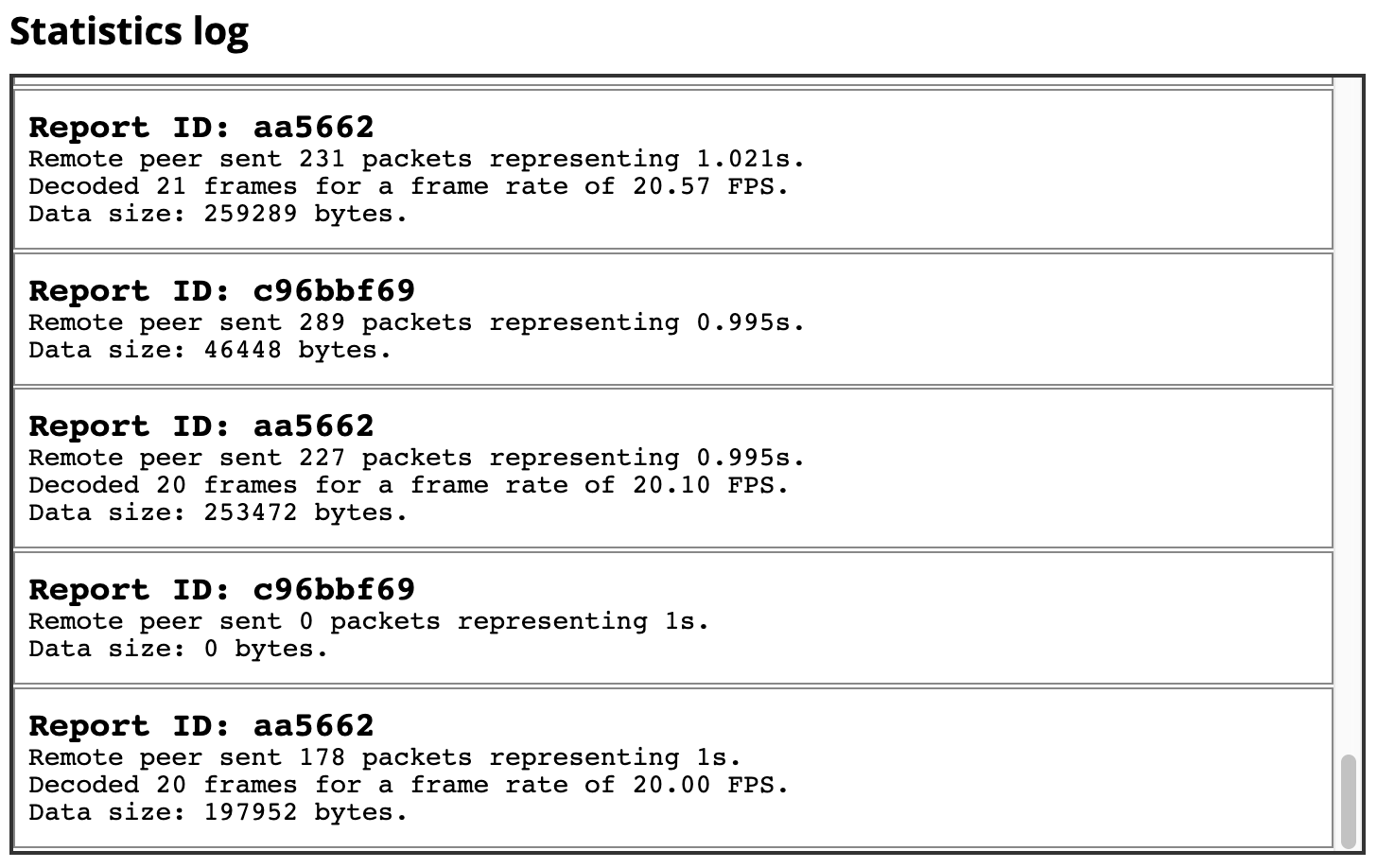
在螢幕截圖中,我們看到一個標題,後面跟著我們稱之為 statsBox 的可滾動 <div>。該框包含許多日誌條目,其中最後幾個是可見的。每個條目代表大約一秒鐘的時間(因為這是我們在呼叫 networkTestStart() 和 networkTestStop() 之間等待的時間)。
規範
| 規範 |
|---|
| WebRTC 統計 API 的識別符號 # dom-rtcremoteoutboundrtpstreamstats-localid |
瀏覽器相容性
載入中…